
Cue Health
From Pandemic Testing to Full-Stack Health (2022–23)
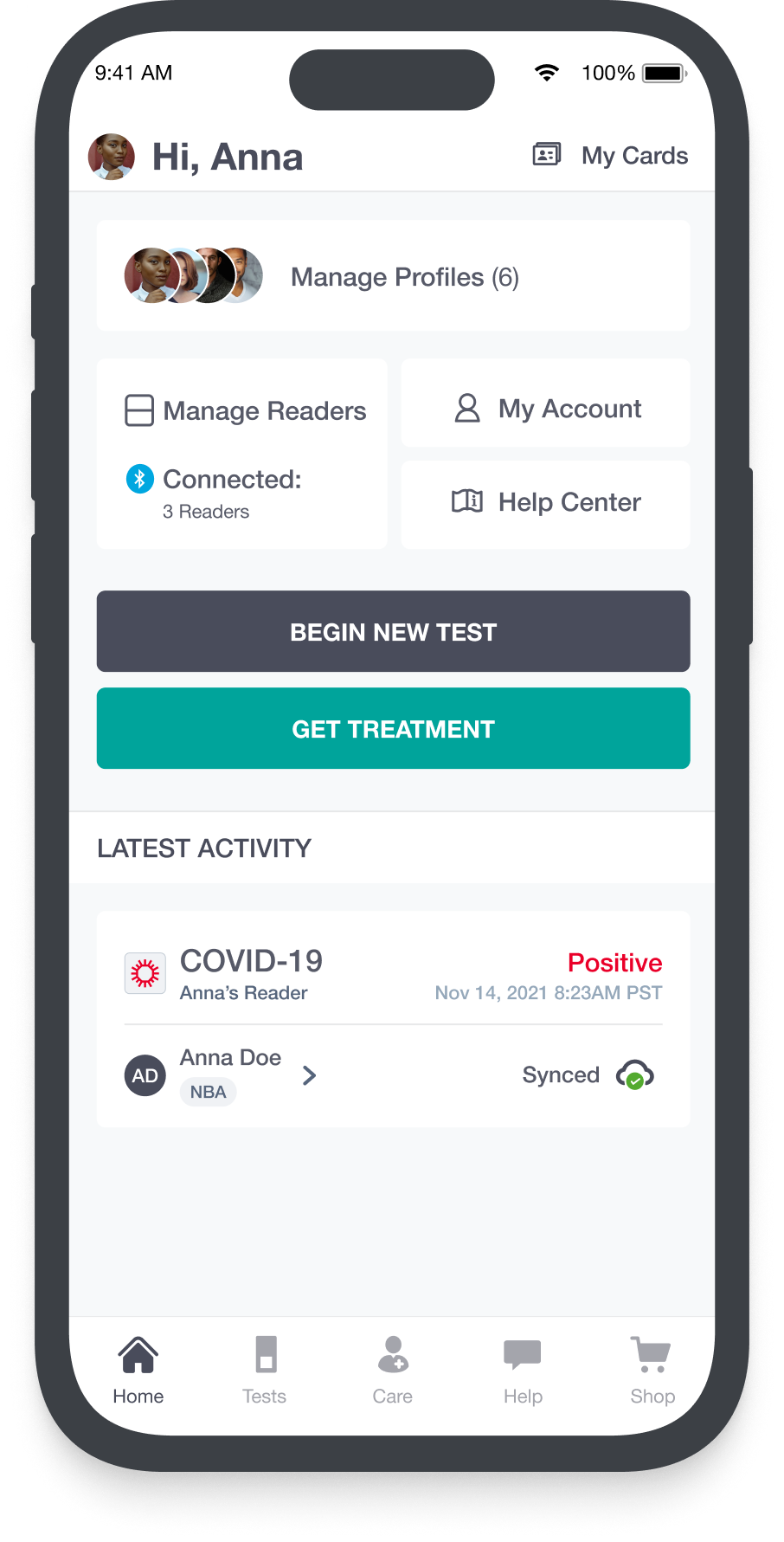
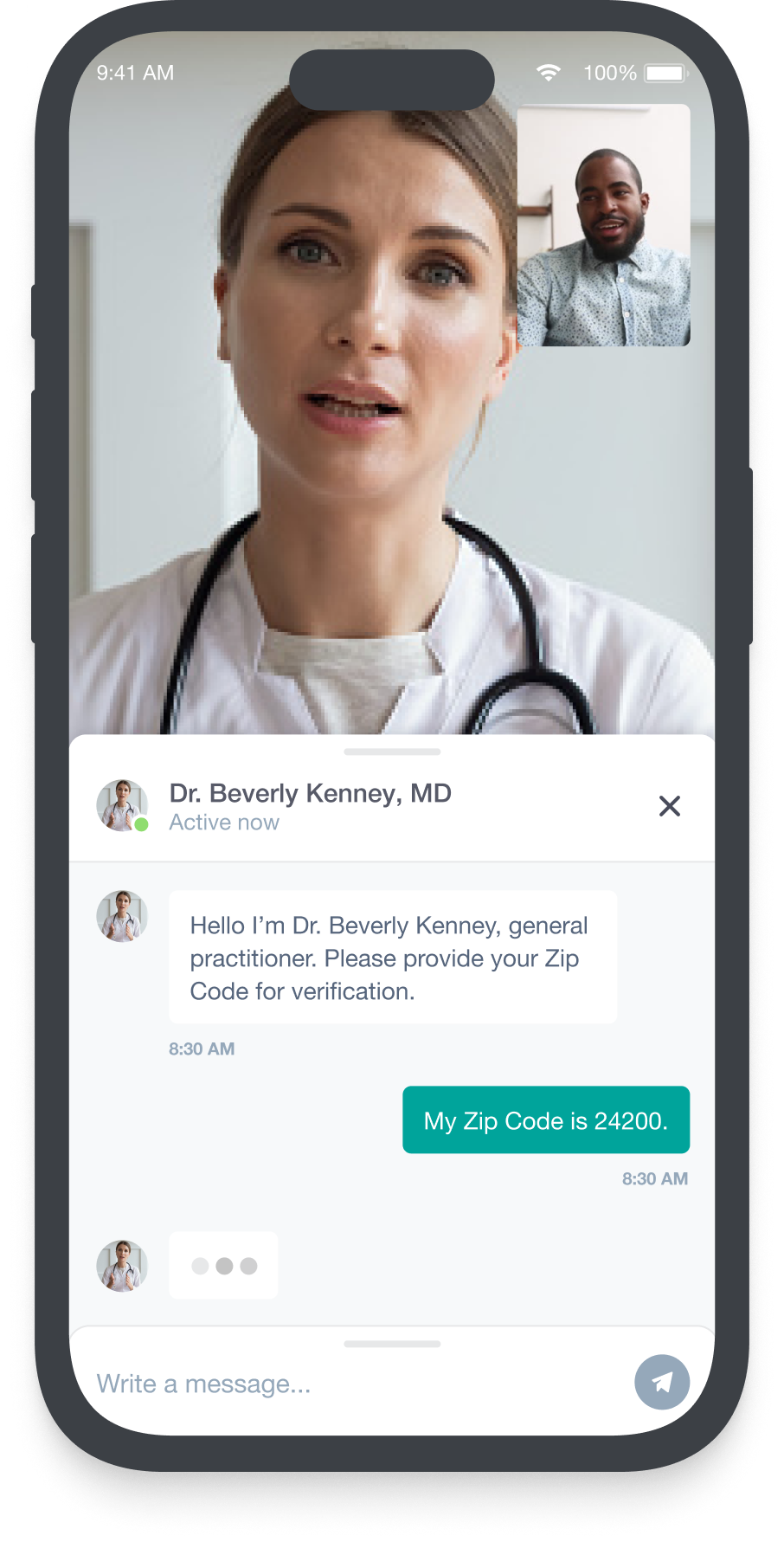
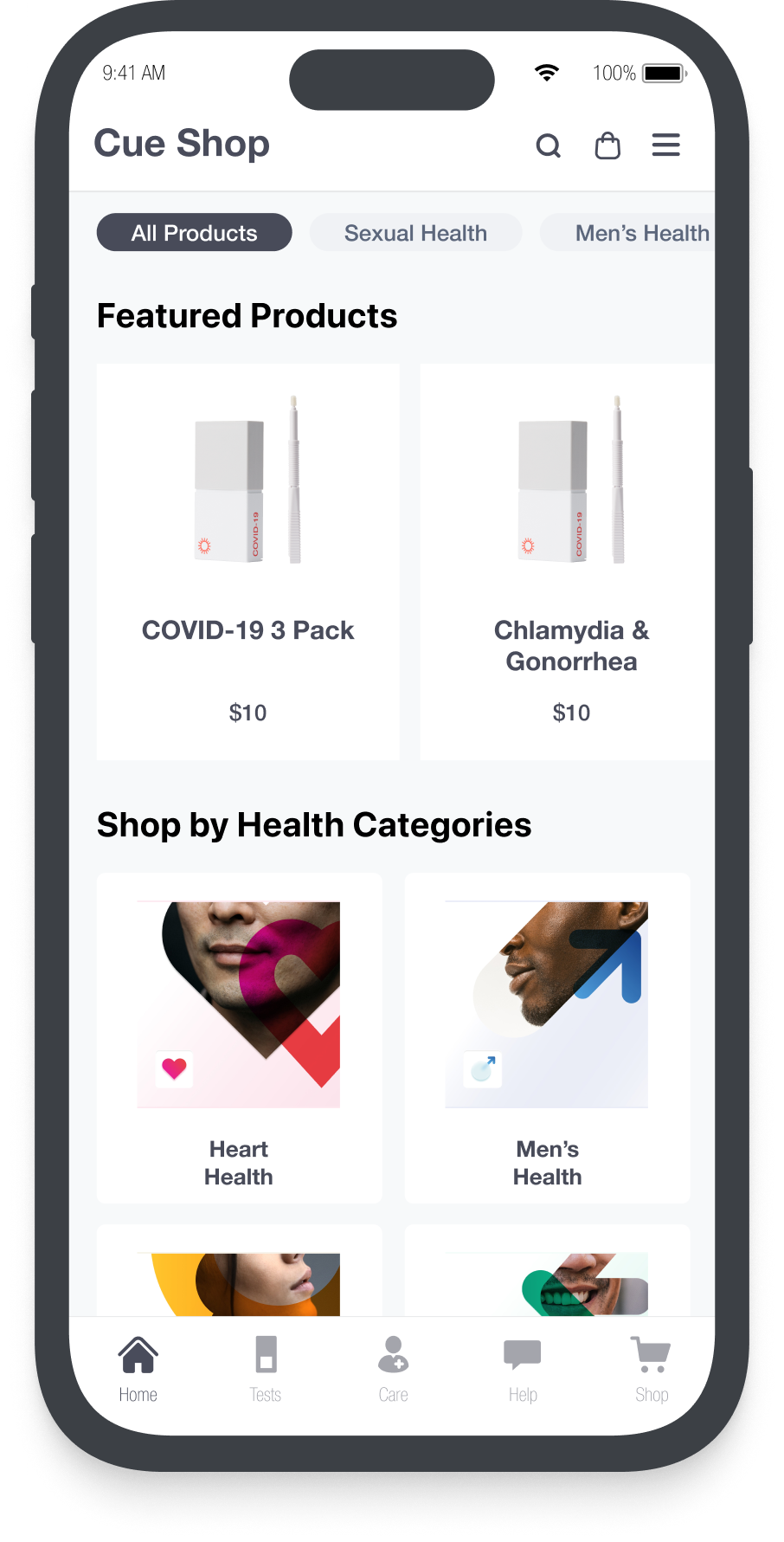
Overview & Scope
Cue Health launched during the pandemic as an at-home COVID-19 testing platform. As the pandemic wound down, the company pivoted to a direct-to-consumer health platform — delivering diagnostics, virtual care, and lifestyle medication through a single app.
Objective
As the pandemic wound down, we shifted to a direct-to-consumer model by focusing on three opportunities:
- Diagnostics: At-home test kits for multiple conditions are shipped to labs, with results delivered in-app and optional follow-up with a healthcare provider.
- Care: Customers can connect with a healthcare provider synchronously or asynchronously through the app to receive guidance and treatment
- eCommerce: The app enables purchase of Rx lifestyle medications (such as ED or STD treatments), coordinating with a healthcare provider to write or upload prescriptions.
My Role
As Senior Product Design Lead, I was responsible for:
- Co-managing the design team and leading cross-functional design initiatives
- Owning the design system and maintaining consistency across app and web
- Presenting to stakeholders and aligning design with product requirements
Team Members
- Senior Visual Design Lead: Owned all visual design execution across app and web
- Project Managers: Coordinated four concurrent projects across engineering and product
- Design Team: Four designers across US and Poland (expanded to Turkey)
End-to-End Flow: From selecting a test to understanding results
Project Roadmap
Alongside new product capabilities, the CEO mandated an app and marketing website redesign. The work was planned across five phases:
- Phase 1: Launch new test kits, including product displays and result-related user actions
- Phase 2: Introduce new treatments (lifestyle meds), defining intake and HCP communication flows
- Phase 3: Redesign the app and rebuild the website to support core app functionality
- Phase 4: Add tools for monitoring and managing ongoing conditions (weight loss, cholesterol, diabetes)
- Phase 5: Evaluate feature performance and optimize against adoption and retention metrics
The End-to-End Flow
1. Ingress
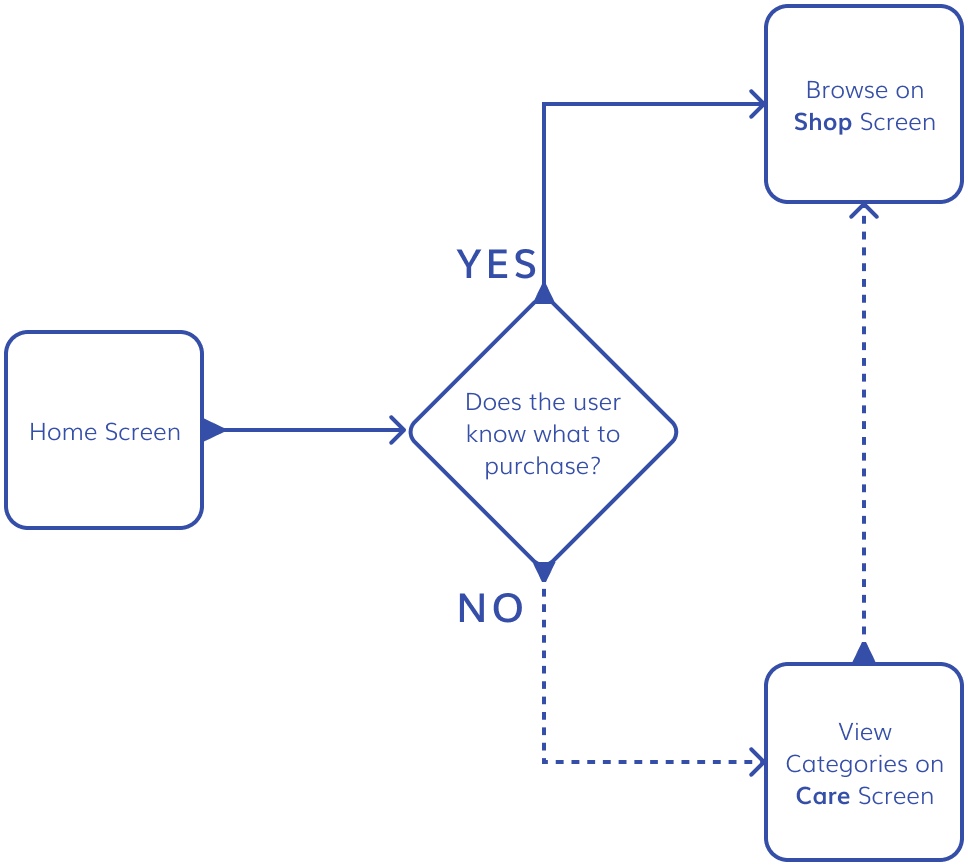
I designed the entry point around two user mindsets — "I know what I need" and "I'm not sure what I need" — which shaped three distinct areas of the experience:
- Home: Clear notifications and status updates
- Shop: Expanded products and improved categorization
- Care: A guided experience that directs customers to the right product
2. Care
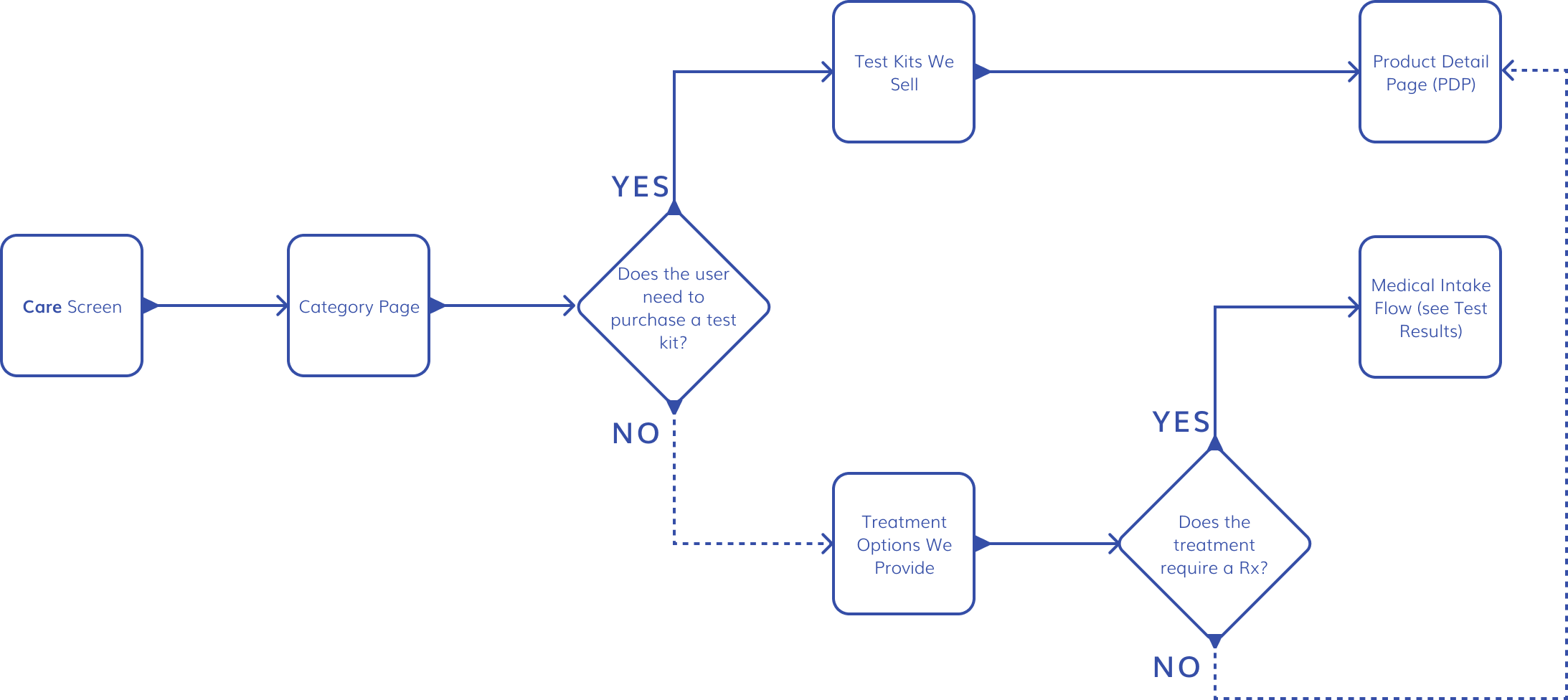
The Care screen enables users to understand conditions and available treatments. Conditions are organized by category, with associated tests and treatments. Users can purchase tests and non-Rx meds directly from the PDP, while Rx meds require an intake and consultation with a doctor.
3. Test Results
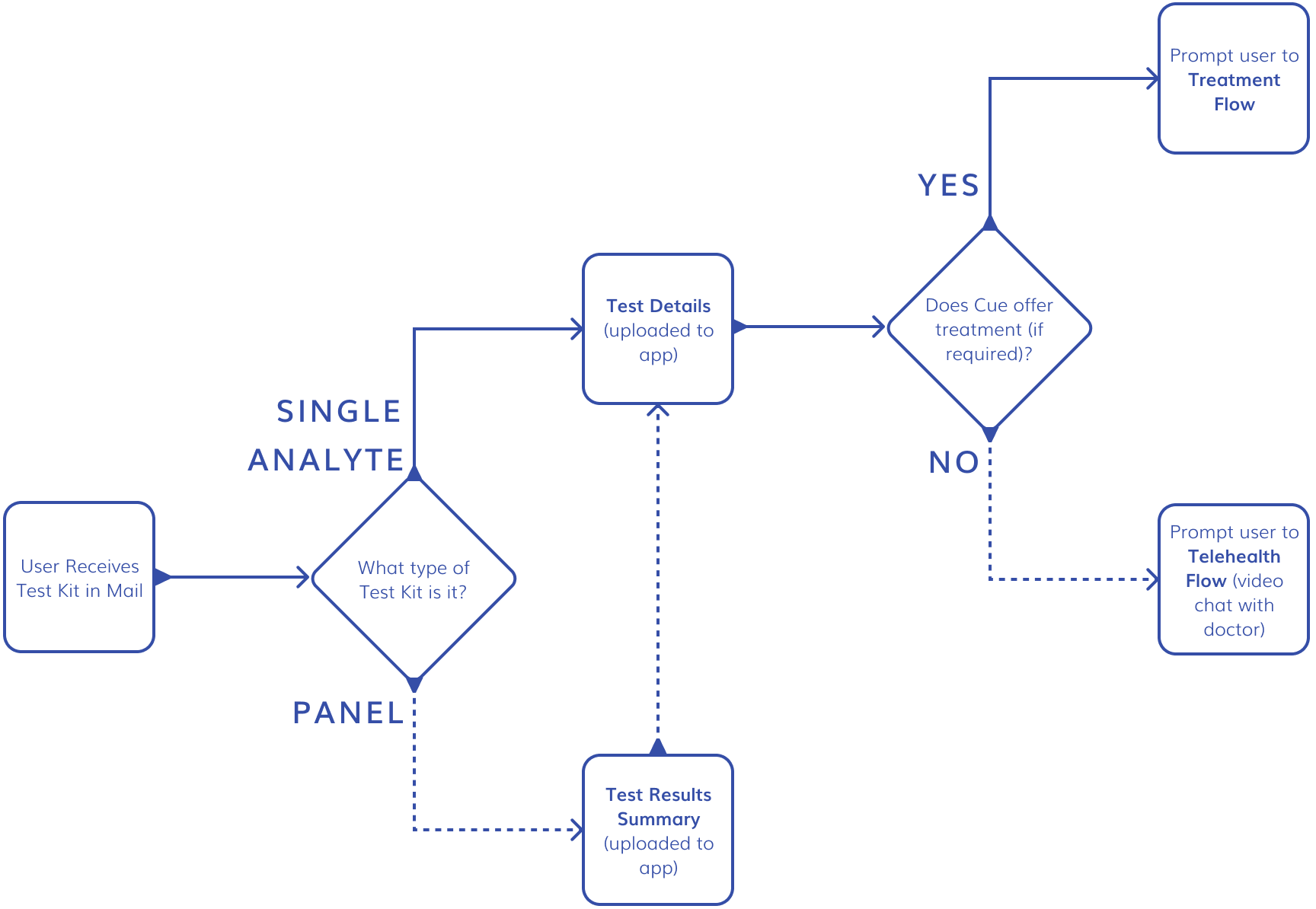
Test results vary by test type and require distinct UI patterns. Single analyte tests show one biomarker — Binary (positive/negative) or Quantitative with interpretation. Panel tests surface a Test Results Summary first, with drill-down to Test Detail pages for each biomarker.
4. Treatment
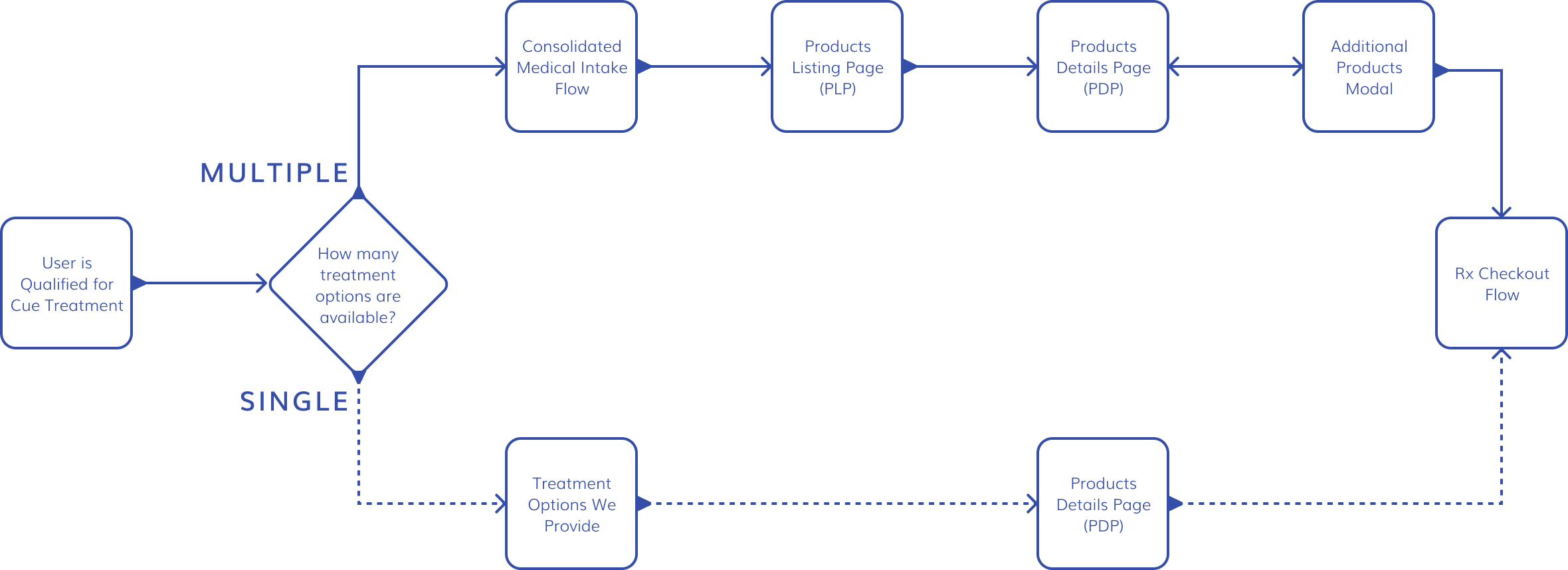
When a user qualifies for Cue treatment, the flow branches based on whether multiple prescriptions are available. If so, users can compare options and adjust quantity, frequency, and dosage on the Product Details page with a modal prompting additional products if needed. Single-prescription cases route directly to a streamlined intake and checkout.
5. Rx Checkout
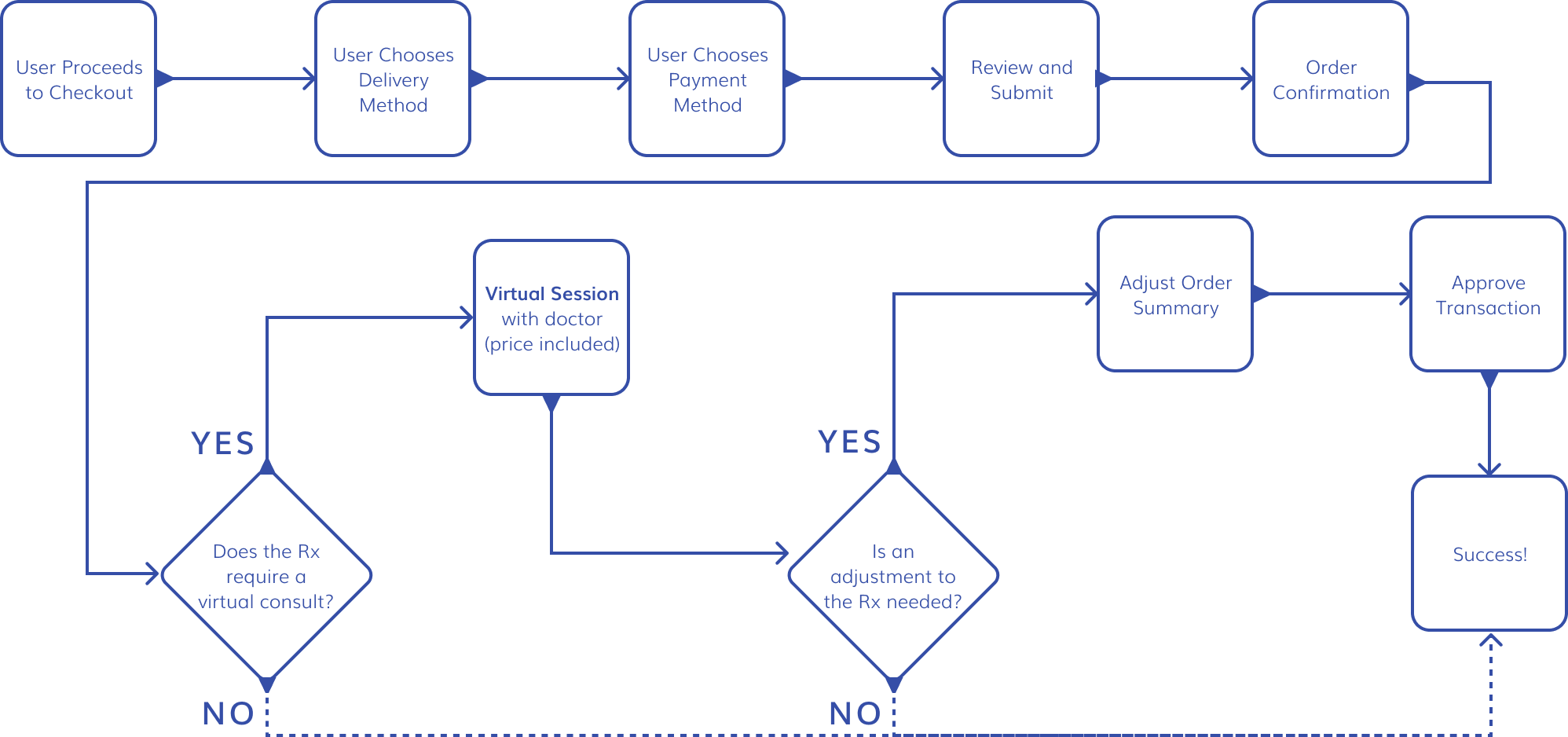
Because Rx laws vary by state, the checkout flow had to handle several complexities: post-checkout dose or frequency changes requested by doctors, cancelled or unapproved orders, and price adjustments with clear, transparent charges or refunds against the pre-authorization. Once an order is processed, the customer's subscription becomes active and is managed in the app.
Tests: Interpreting Results
Diagnostics covers registering, taking, and interpreting tests. While the marketing team owned the first two areas, I focused on the interpretation layer, structuring designs by biomarker type. My scope included home-screen activity cards and the test summary/detail screens. I designed end-to-end flows, defined condition categorization logic, and delivered designs for all scenarios.
Single Analyte
A Single Analyte test is for a single biomarker, and has two categories:
- Binary qualitative: yields a binary response ("positive/negative" or "detected/not detected")
- Quantitative + qualitative: produces a numeric value within a defined range, which determines the result classification ("low/high")
In some cases, treatment is an option via the Cue Health app; in cases where it is not, the user can speak directly to a Health Care Provider via Virtual Chat, a face-to-face telehealth appointment in the app.
Single Analyte/Binary Qualitative > Positive > Treatment Available
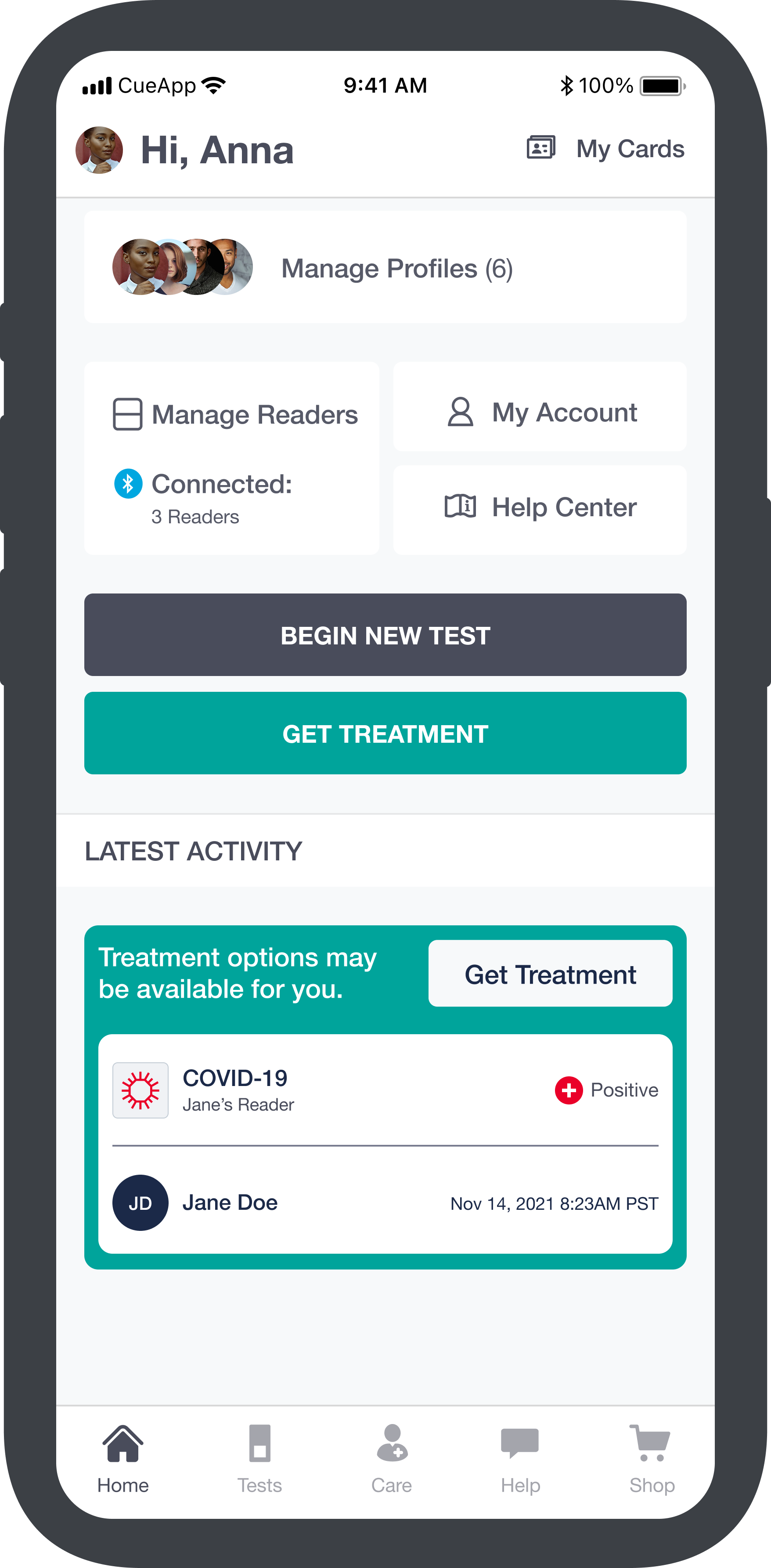
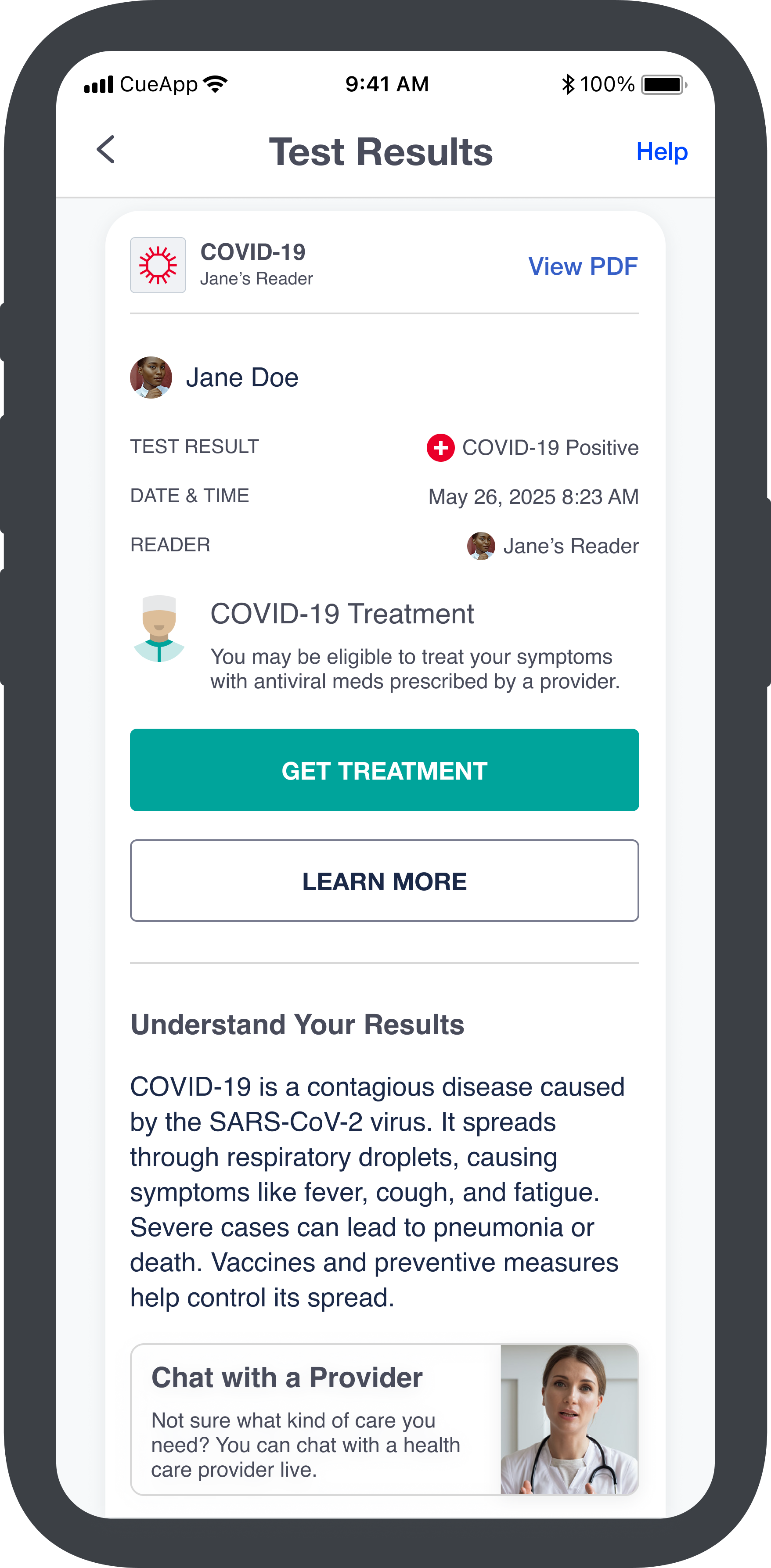
The top-row examples (COVID and Vitamin D) include available treatments, shown in green and accessible from the results card. In contrast, Colon Cancer (bottom row) offers only virtual HCP chat and supplemental Care content. We avoided displaying negative results on the home screen, opting instead for the less alarming "See results."
Panel Tests
A Panel Test is a test for two or more biomarkers, and falls into two categories:
- Binary qualitative: the same as above for multiple biomarkers; primarily used for STD tests
- Binary quantitative + qualitative: same as above for multiple biomarkers; primarily used for cholesterol, kidney, liver, and fertility tests
Panel/Binary Qualitative > Positive
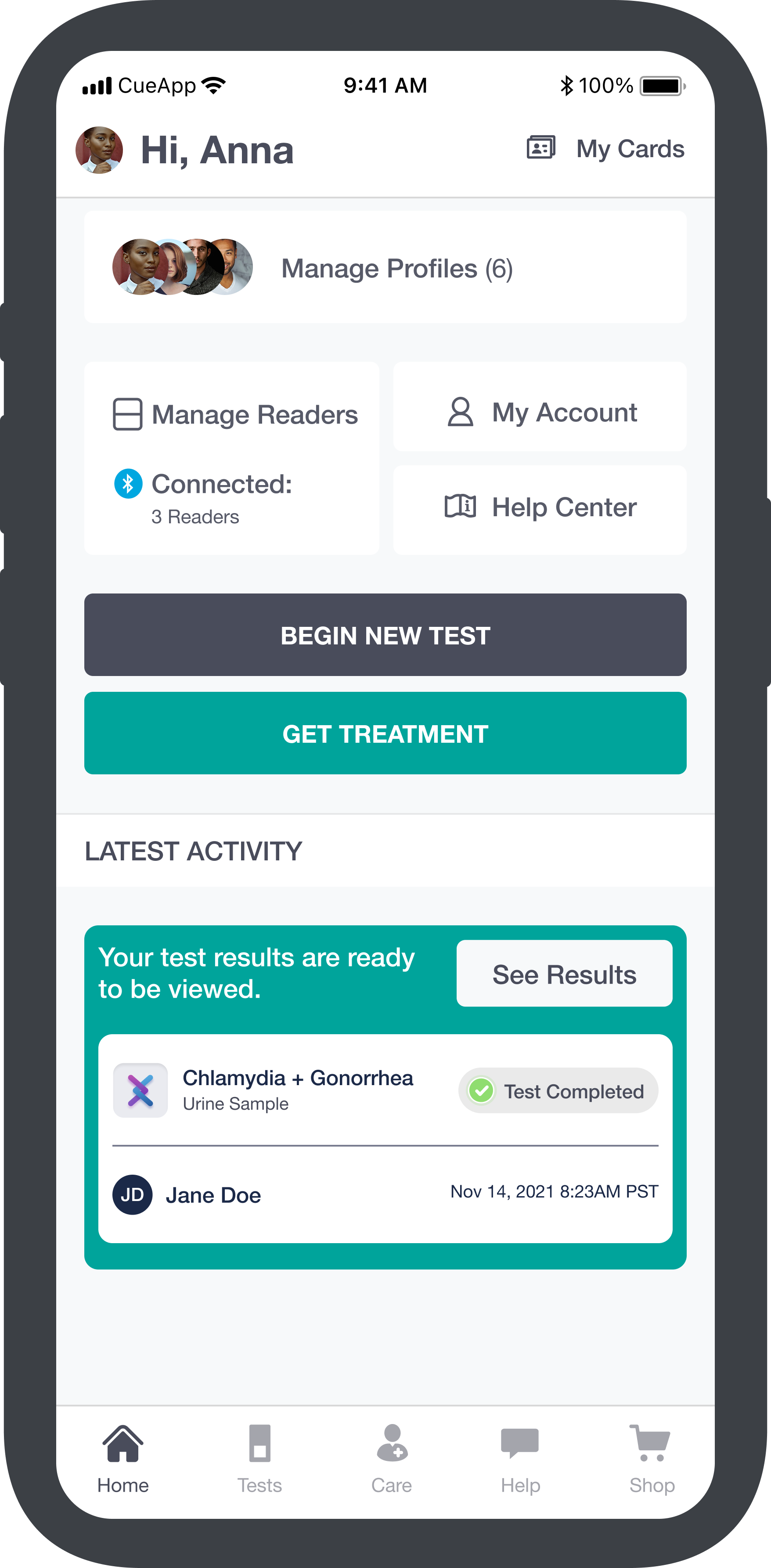
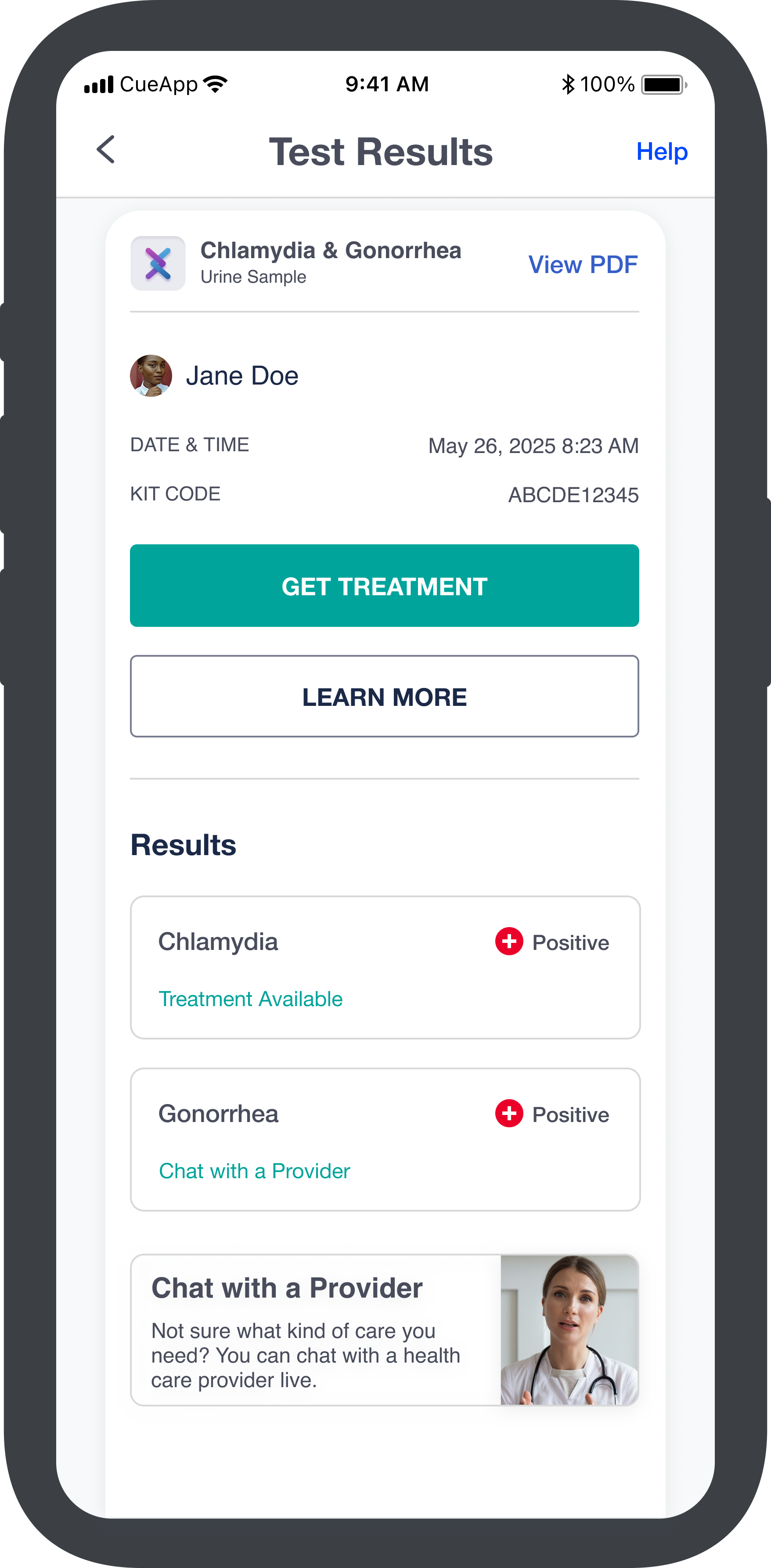
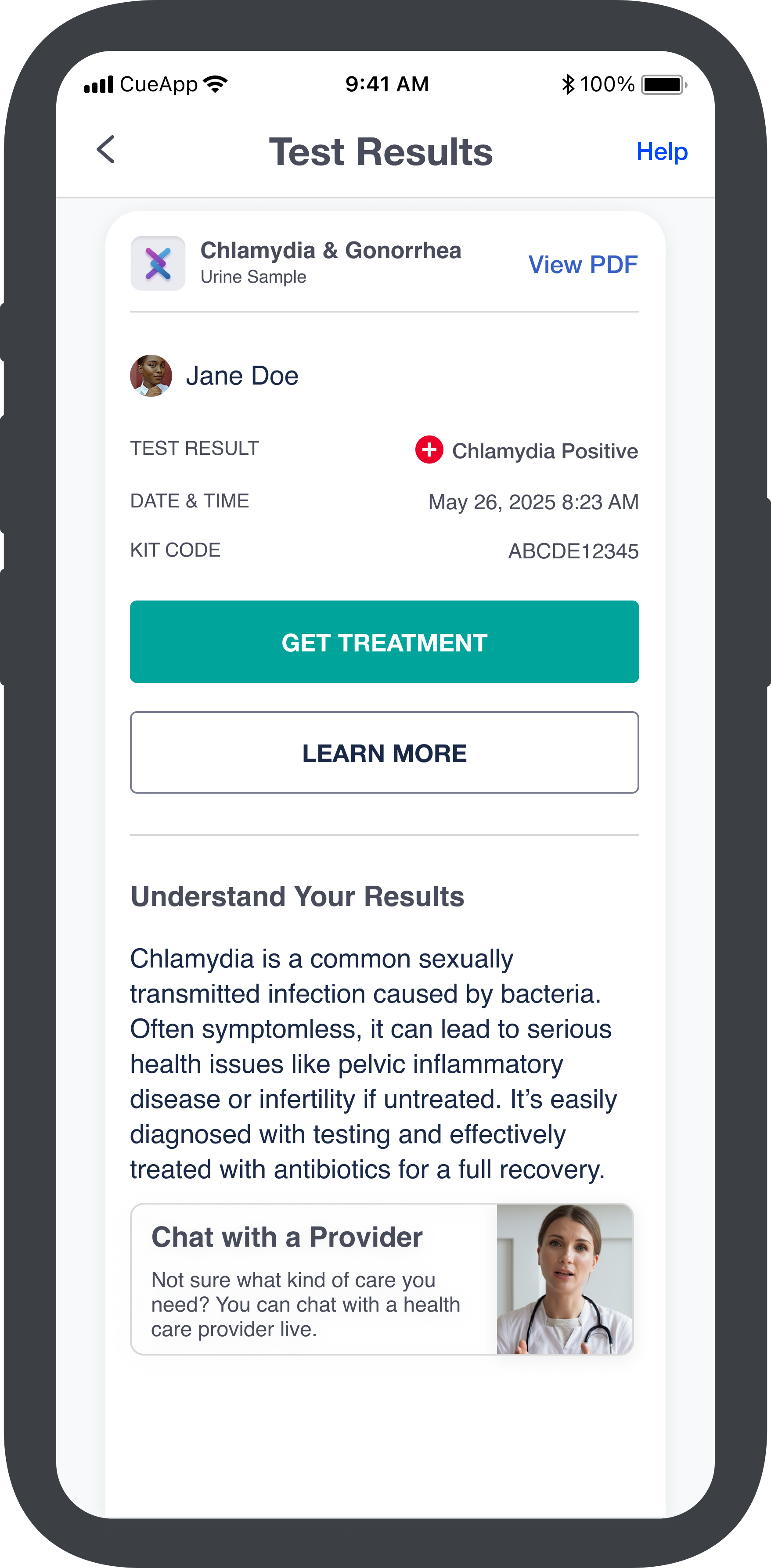
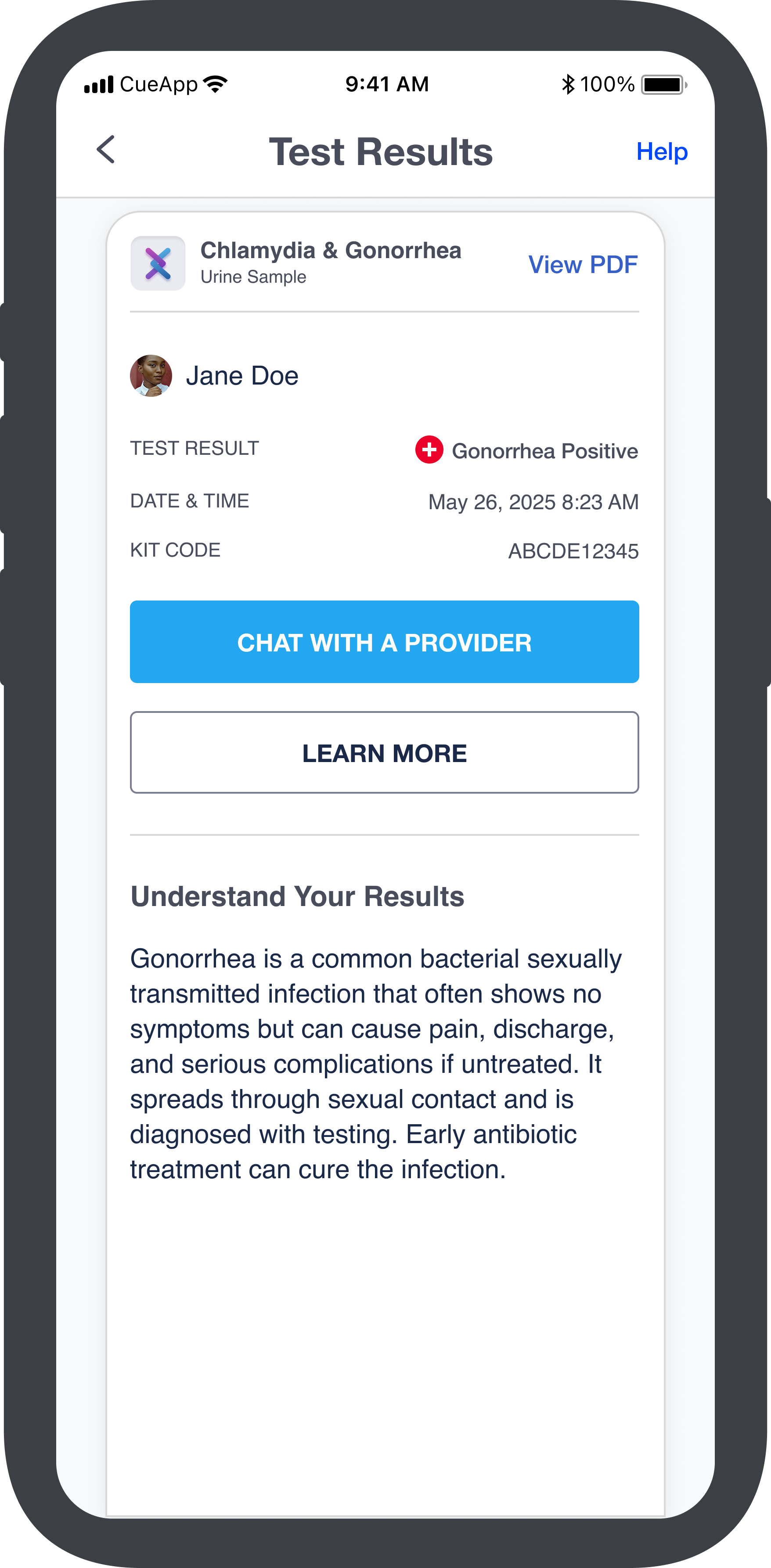
Panel tests include an additional Summary that lists each result, while Single Analyte tests go directly to the Details. The designs shown establish reusable templates and patterns for 24 new tests, enabling the dev team to plug in test- and biomarker-specific content.
Care: Treatment Flow & Outcomes
Existing Care Experience
The existing Care screen supports two primary paths:
- Virtual Care: Connects users with an HCP via video or text for general health visits
- COVID-19: Upload a positive test result — taken in-app or from an external test — to receive a treatment prescription
Primary Use Case
Care includes all paths to treatment or next steps, whether or not we provide them. For example, while we sell colon cancer screening kits, we don't offer treatment, so we defined experience fragments for every outcome to ensure appropriate care.
- Rx we offer: HCP prescribes an in-catalog medication → Rx checkouts (supports single and multiple prescriptions)
- Rx we do not offer: HCP prescribes an out-of-catalog medication → Rx referral
- No Rx: HCP does not prescribe meds → no action or referral
- Communication: All synchronous (video) and asynchronous (text) messaging and history
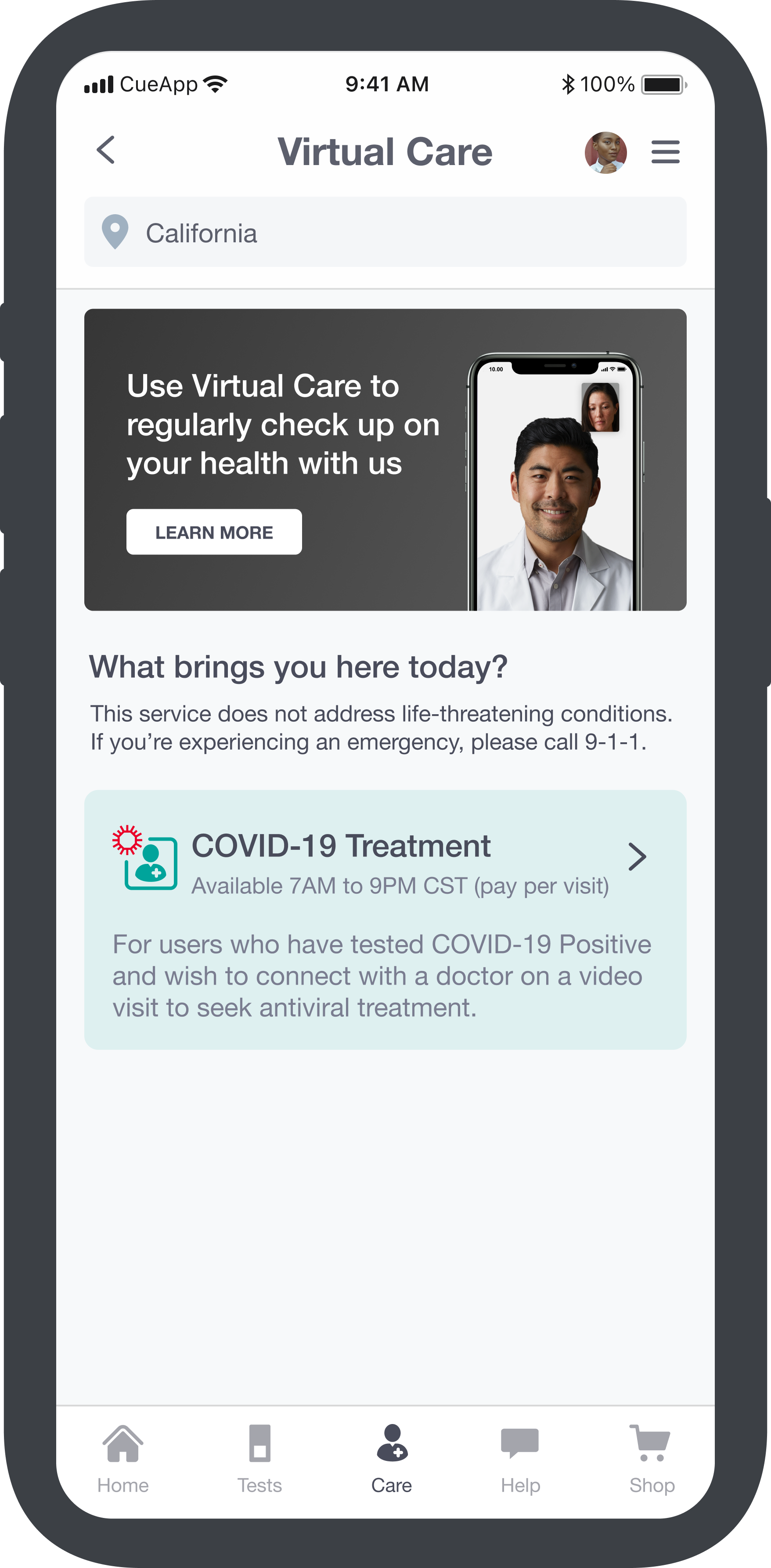
Revised Approach
The updated flowchart is more streamlined and focused on actionable treatments. Key differences include:
- Removal of test products
- Fewer treatment products and categories
- Inclusion of the synchronous and asynchronous general health consults
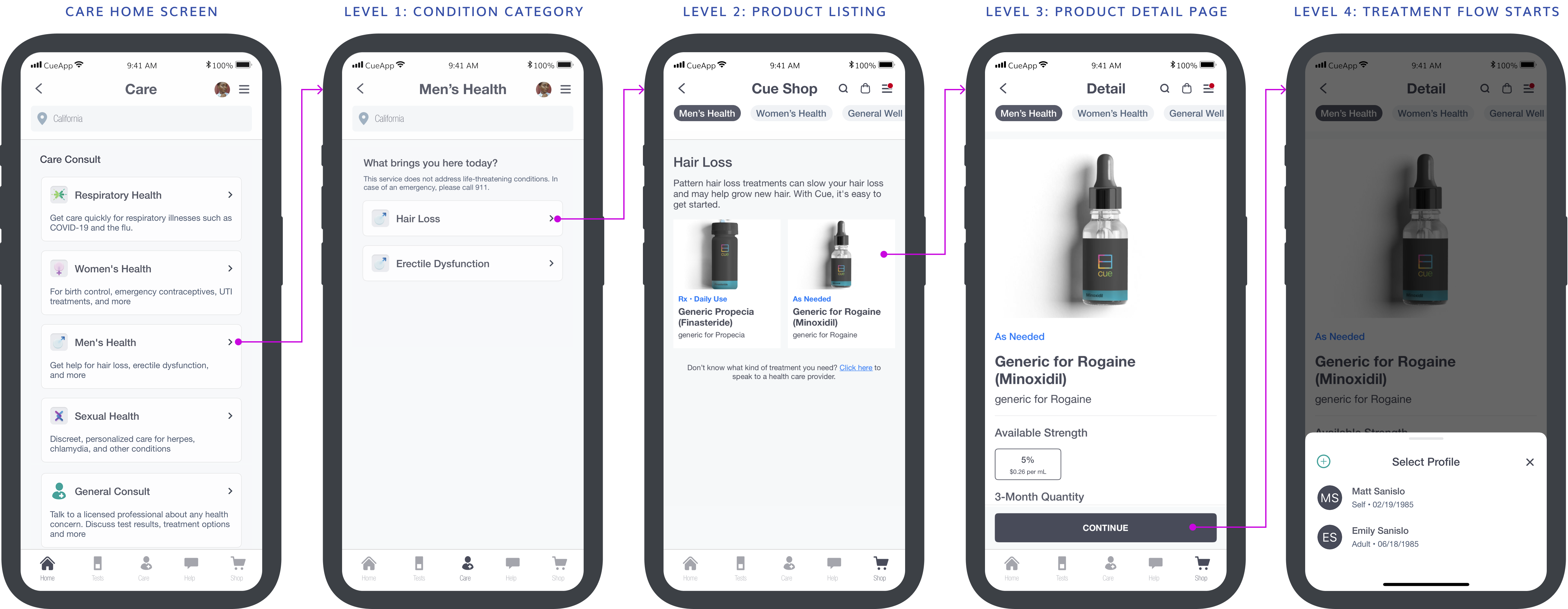
"Merchandised" medications appear in level 2 while "non-merchandised" medications are never shown; instead, users are routed directly into the treatment flow.
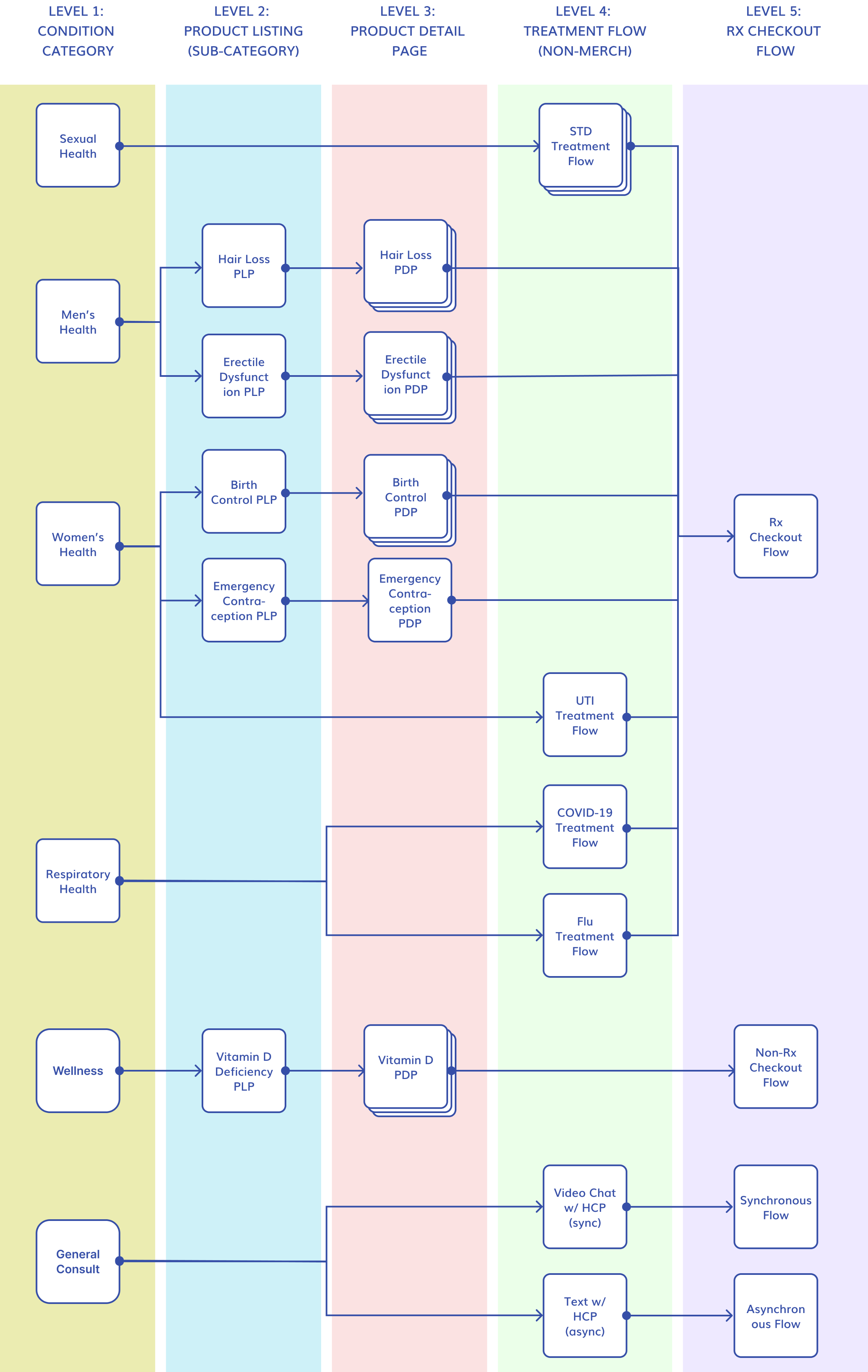
High Fidelity Designs
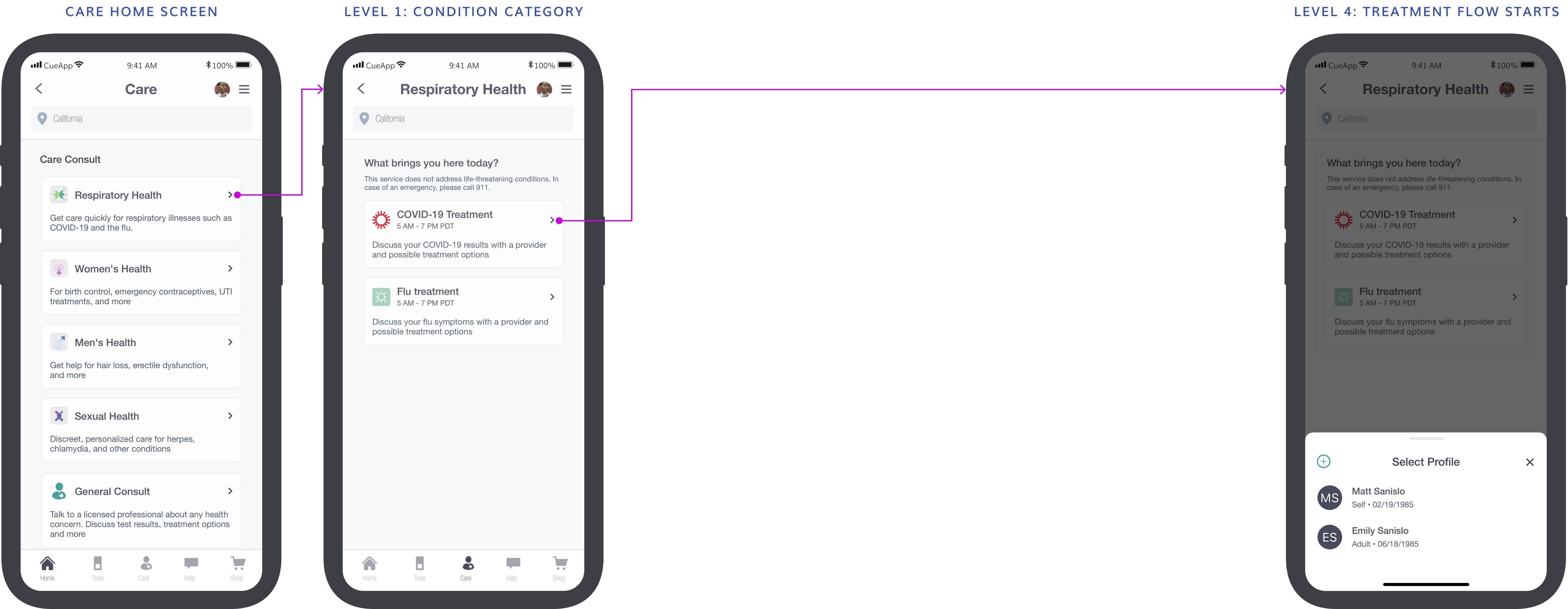
Working with a colleague who designed the iconography, I mocked up screens for the dev team to build from. Below are two examples:
- Respiratory Health: Non-merchandised meds that require users to enter medical info before a brand is identified; not available in Shop
- Men's Health: Merchandised meds selected by the user; also available in Shop
Website: Government Contract
Minnesota Department of Health
As part of Phase 3, Cue won a contract with the Minnesota Department of Health to bring COVID-19 treatment to the web — extending the app experience to a broader audience with distinct accessibility and language requirements. This required enabling Minnesota residents to connect with an HCP and receive a prescription entirely through the website. Given the likelihood of use by older adults and people with disabilities, accessibility, plain language, and simple interactions were top priorities. Web designs were brought in line with the app for the first time, establishing a consistent cross-platform experience.

Orientation Flow
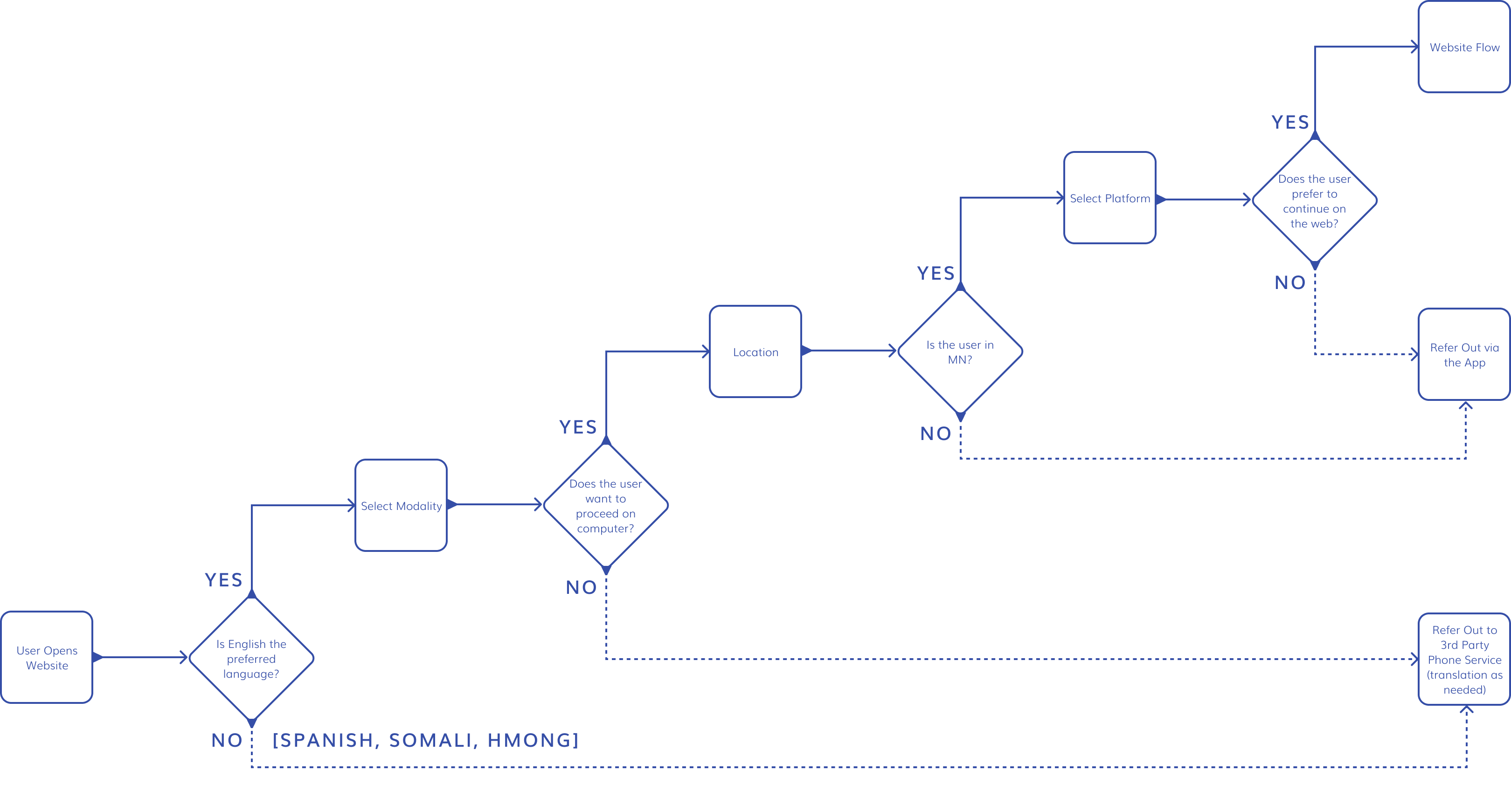
This project enabled us to extend the app experience to the web, while accounting for project-specific nuances. I began by mapping requirements for the orientation flow based upon:
- Language: The state required support for English, Spanish, Somali, and Hmong
- Location: Minnesota residents receive treatment at no cost if prescribed; all others must pay
- Platform: Users can access care via the website, app, or phone service
Landing Pages
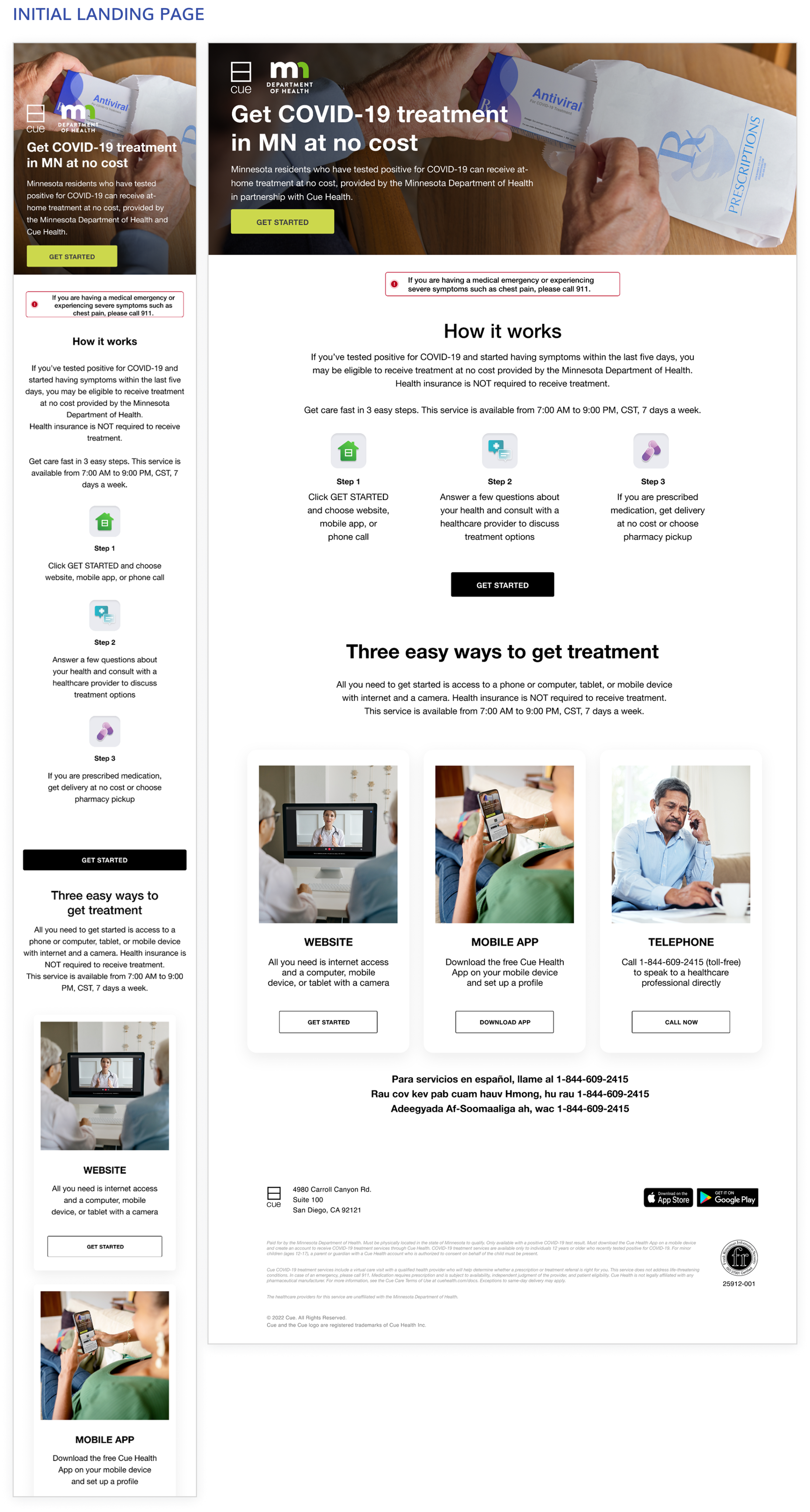
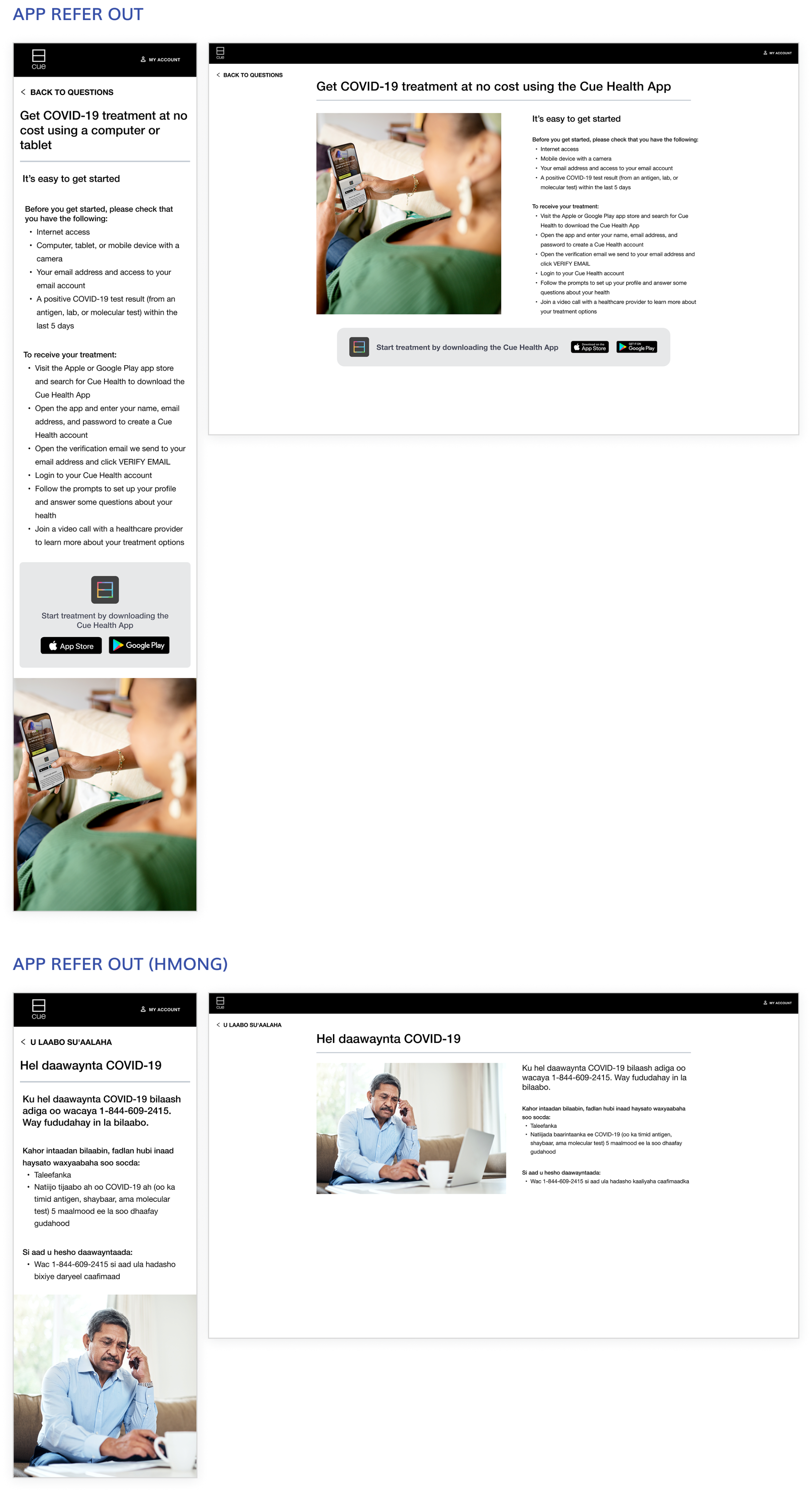
The landing page content was provided by marketing, while my team influenced layout and interactions. There were three types:
- Primary: Entry point from the MN Health Department URL
- App refer-out: Prompts users to download the app
- Phone refer-out: Provides instructions for contacting OpenLoop, a third-party phone service (available in all four required languages)
Medical Intake Questionnaire
At the core of the experience for signed-in users was the Medical Intake Questionnaire. While the content is provided by our third-party partners and not editable by us, we had no prior experience designing this outside the mobile app. It was divided into four sections:
- Personal Information
- Delivery Preferences (at-home delivery versus pickup from a pharmacy)
- Medical Intake
- Treatment logistics (such as insurance and post-visit summary)
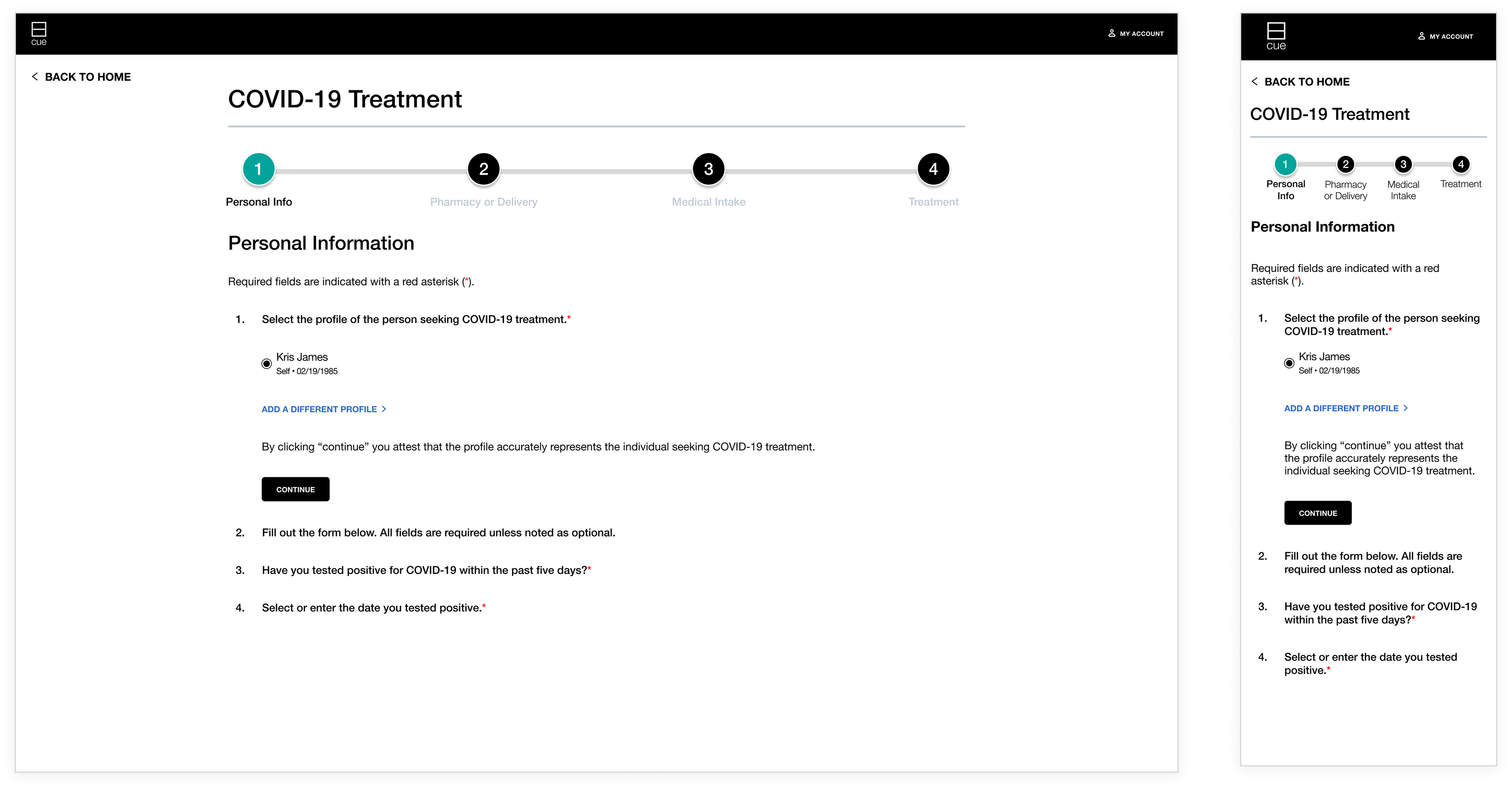
In addition to designing the UI for every questionnaire scenario at mobile and desktop breakpoints, three key issues were addressed:
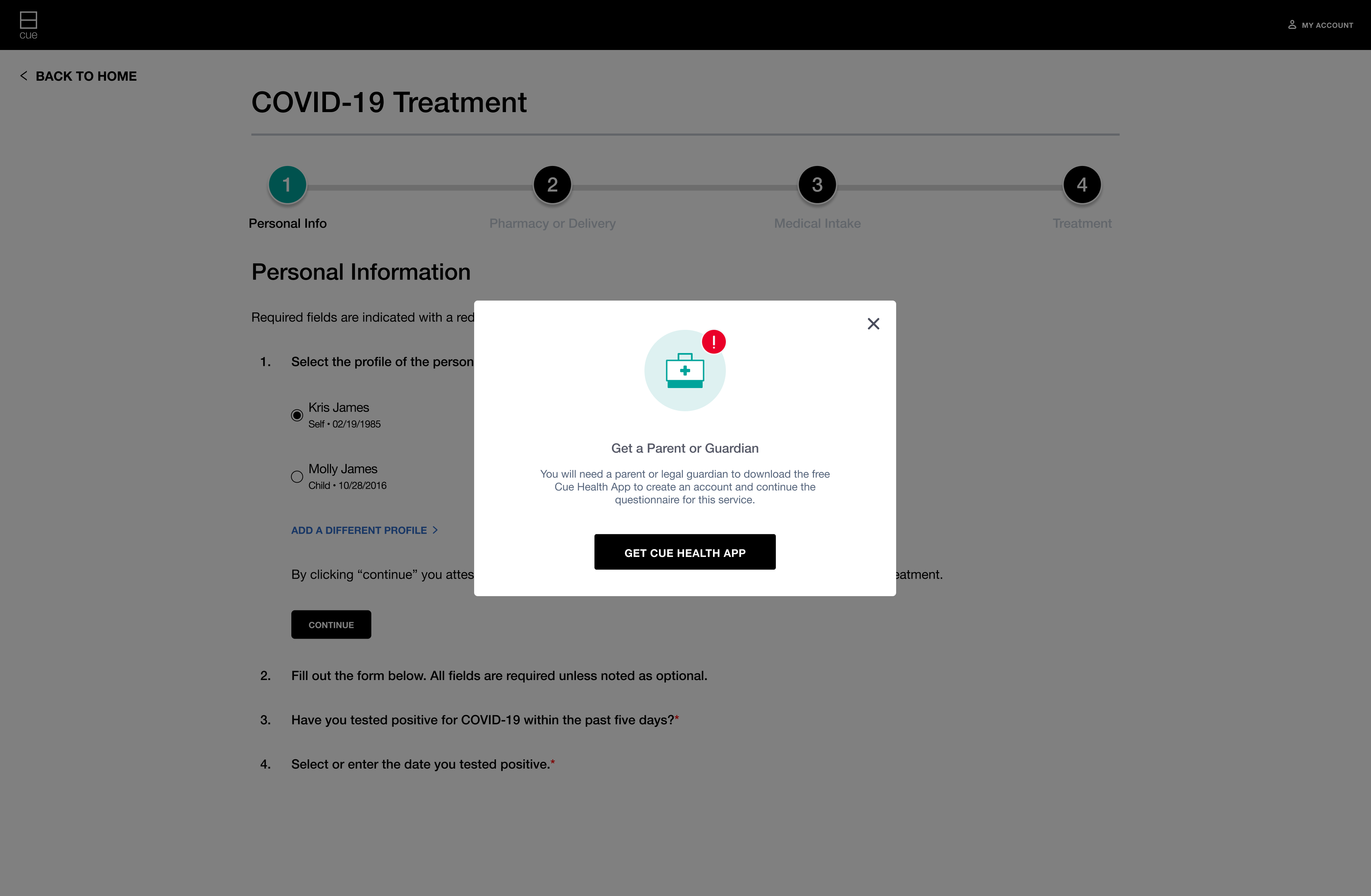
- Refer-outs: When a user is ineligible for treatment, we display a message explaining the issue and next steps (see left)
- Progressive reveal: Conditional logic reveals questions based on responses, allowing engineers to build a single page rather than multiple ones
- Progress bar: Despite conditional questions, the progress bar remains static within each section while showing overall progress across the questionnaire
Post Visit & Project Outcomes
After the session, users receive a visit summary with collected information and results. Prescribed medications are managed via the app. The project was delivered within the 5-week deadline, yielding several key outcomes:
- The MN Department of Health renewed our contract for two additional years
- The company was positioned to pitch similar contracts to other states
- I designed a significant portion of the end-to-end experience, reducing future website scope
- Web designs were aligned with the app's look and feel, which was not previously the case
Conclusion: Reflections & Takeaways
This role gave me my first opportunity to manage a team while balancing hands-on design responsibilities. Beyond the work shown above, I also oversaw designs led by other designers — including checkout and subscription flows — while building the systems that kept the team aligned: a pod structure for PM-designer pairing, a product → design → engineering → QA workflow, and the groundwork for a company-wide redesign. The Cue experience launched on both app and web, helping Minnesota residents access the care they need.