
Toyota Digital Redefined
Building a Lasting Relationship (2021–22)
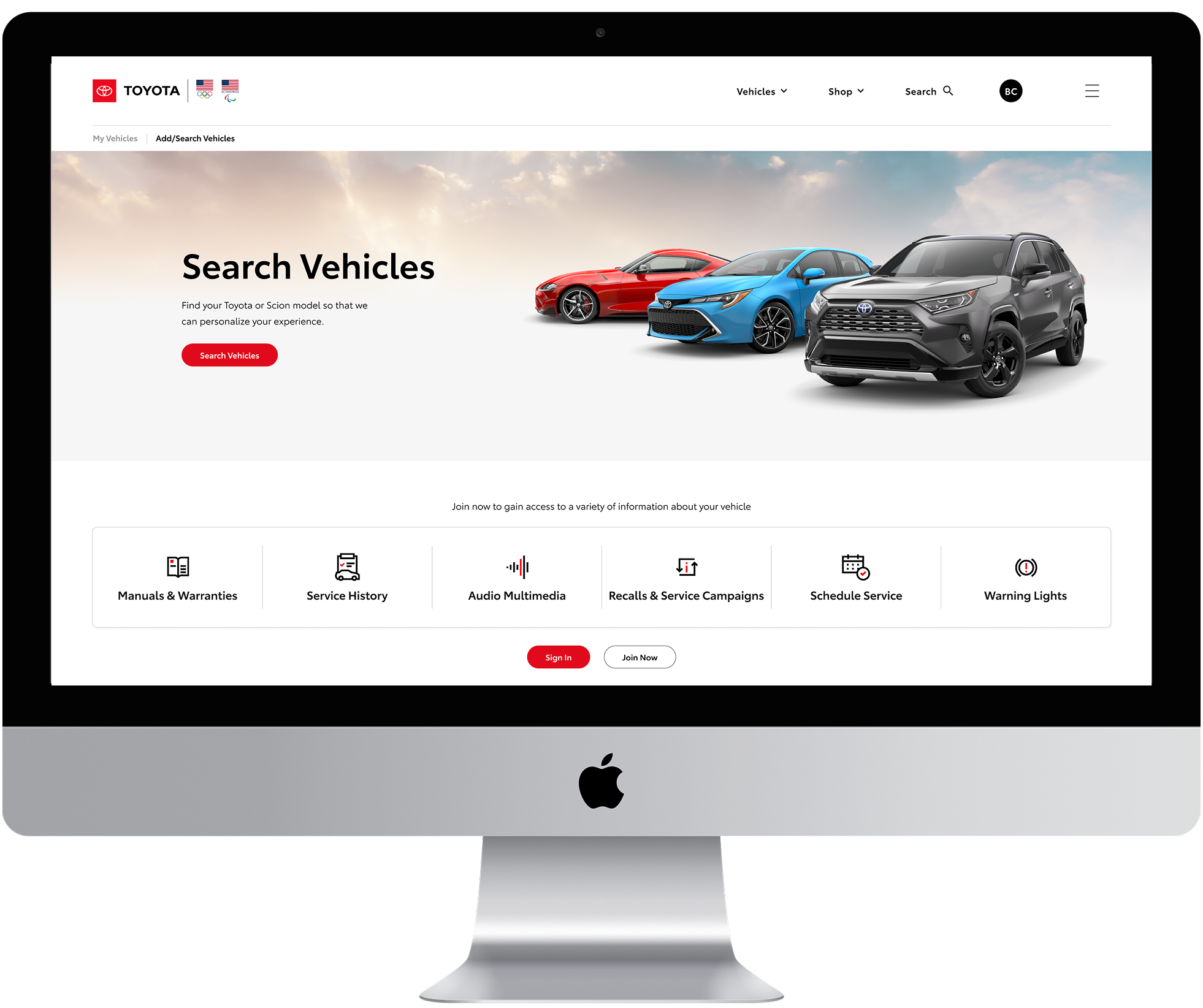
Overview & Scope
Toyota's digital presence spanned three fragmented platforms — Toyota.com, ToyotaOwners.com, and SmartPath. Our agency was engaged to lead Toyota Digital Redefined (TDR), a strategic initiative to unify these into a single, cohesive ecosystem supporting customers across the full ownership journey.
The unified platform would give customers a seamless experience from initial consideration to long-term ownership, while consolidating three codebases into one — simplifying development and elevating the brand.
Objective
The initiative extended Toyota's customer relationship beyond vehicle purchase through a full redesign — new pages, a unified global navigation, and migration of three platforms into a single codebase. Within this transformation, my team owned the design and launch of the Owner's Vehicle Dashboard, defining its role and functionality within the new ecosystem.
The unified platform gives customers a seamless experience from initial consideration to long-term ownership, while simplifying Toyota's development and elevating the brand.
My Role
As Experience Designer (XD), I was responsible for:
- Creating annotated, medium-fidelity wireframes defining component functionality and interaction strategy
- Planning holistic page layouts, including all navigation pathways to, from, and within the site
- Balancing business objectives with user needs across the TDR ecosystem
Team Members
- Business Analyst: Defined and documented business requirements for design, development, and stakeholder alignment.
- Visual Designer: Translated wireframes into high-fidelity designs, ensuring visual consistency with the style guide.
- Client Partner: Primary liaison between our team and Toyota's Product Owner.
- Producer: Managed sprints and coordinated work through Jira.
Defining the Scope: Multi-platform Effort
The Existing Experience
This large-scale initiative spans every page across three platforms and is expected to influence the future design of Toyota's mobile app. From the outset, the work was organized into loosely defined phases to allow flexibility as the vision evolved.
I joined the project during the initial exploratory phase and remained through the MVP launch at the end of the fiscal year. This case study focuses on the MVP, which centered on a complete redesign of the logged-in Owner My Vehicle Dashboard. While the original scope was limited to the logged-in experience, the client later expanded it to include the logged-out state and global site navigation based on our team's recommendations.
I identified several areas of opportunity within the existing logged-in Dashboard. The approach focused on preserving components with high customer engagement while consolidating or removing elements with low usage. The following components were evaluated:
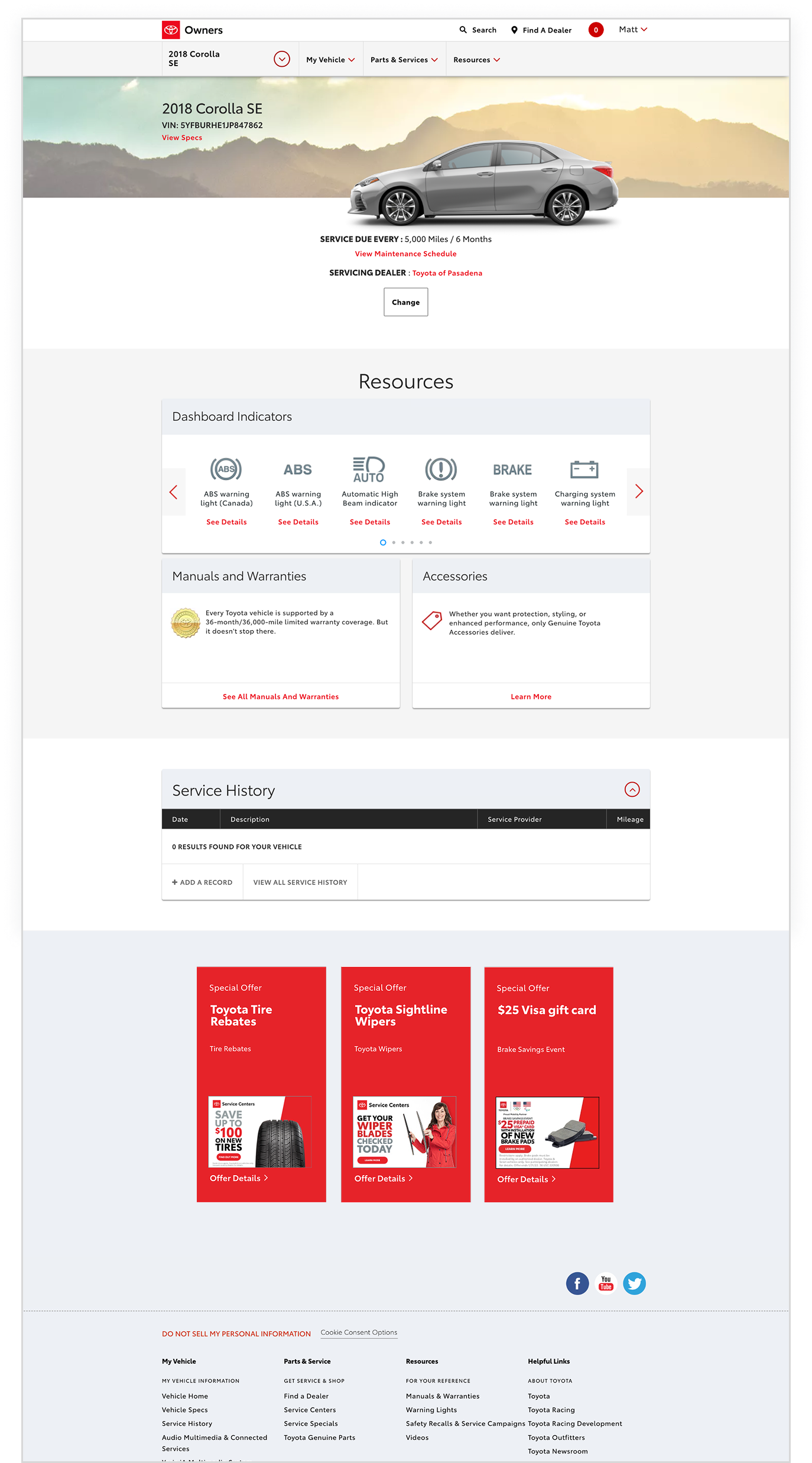

- Vehicle Selector: Enables users to select a vehicle by model and year; historically exhibited very low engagement.
- Dashboard Marquee: Displays top-level vehicle information and dynamically updates based on whether a VIN has been entered.
- Resources: A collection of links and tools that help users navigate the site and access vehicle-specific information.
- Service History: Provides a record of all services performed on the vehicle; availability is dependent on VIN entry.
- Servicing Dealer: Offers quick access to the dealer associated with the vehicle or selected by the user.
Refocused Direction: Better Defined Use Cases
Proposed Direction
After establishing a stylistic framework during the exploratory phase, I created a component diagram to scope the MVP — determining what to include, defer, or cut entirely. Key decisions:
- Quick Tools Menu: Consolidated lower-engagement links into a focused menu to reclaim in-page real estate.
- Search: Moved to global navigation, reducing redundancy across the experience.
- Recall Banner: A legal requirement requiring careful handling due to data feed inconsistencies between the back-end and content.
- Service History: Among the highest-utilized features on the existing site — retained and refined as a core MVP component.
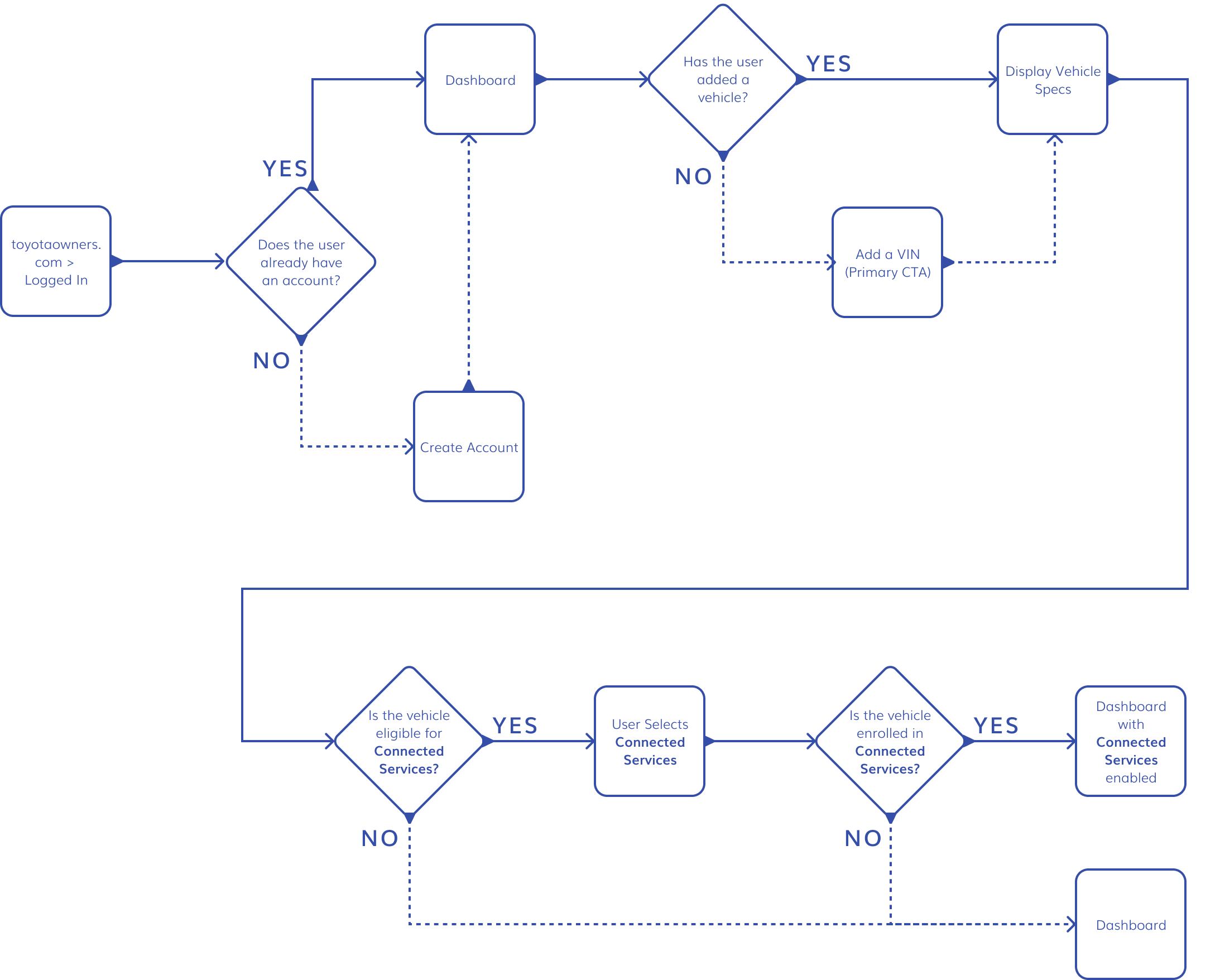
With scope defined, I planned for the page's multiple user-dependent states: VIN entry (users who provide a VIN unlock vehicle-specific data feeds, though low entry rates made this a tracked KPI), Connected Services enrollment (visible only in the VIN-entered state, managed via the mobile app), and Model/Year variations (the page needed to flex across Toyota's full vehicle lineup in both states).
To map dependencies, conditions, and content triggers across every scenario, I created a flow chart covering each use case end to end — giving design and development a shared, systematic reference for launch.
Shifting Scope
To accommodate the MVP requirements while leaving room for iterative post-launch improvements, I proposed the following approach:
- Timeline:
- 6 weeks (3 sprints) for design to ensure sufficient handoff time for development and QA
- 4 weeks (2 sprints) dedicated to Experience Design, allowing the Visual Designer time for high-fidelity refinement and revisions prior to handoff
- Design Approach: I recommended designing each component independently and constructing pages like Lego blocks.
- Each component was built to account for variations in data, user state, and functionality
- This modular approach enabled detailed thinking about interactions, simplified iterative updates, and supported flexible assembly of pages for different states (e.g., VIN-entered vs. non-VIN, Model/Year variations)
This approach ensured the MVP could be delivered efficiently while maintaining flexibility for enhancements in future phases.
Building the Page: Medium Fidelity Designs
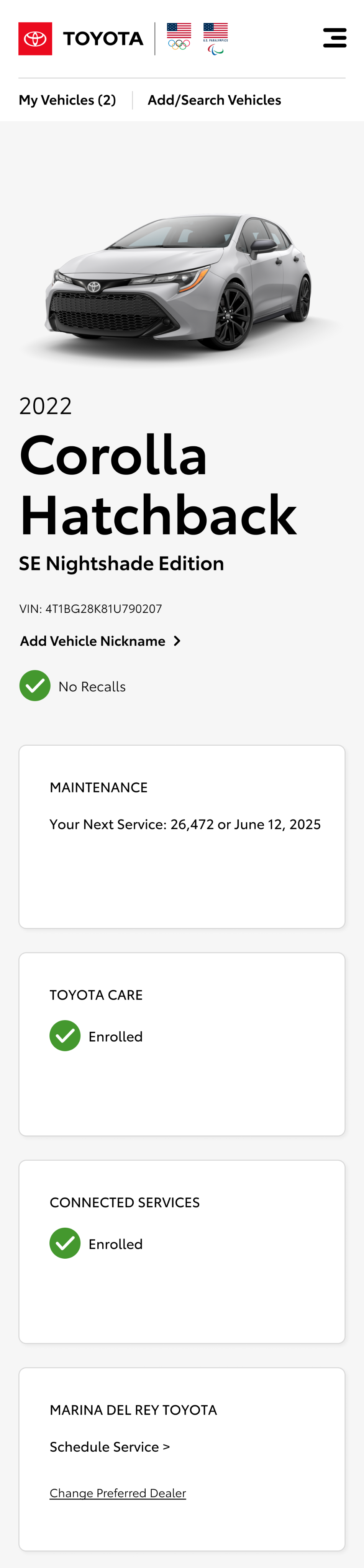
Marquee & Sub-Marquee
The Sub-Marquee surfaces the most relevant snapshot of a user's ownership status — maintenance due dates, enrollment state, dealer info — directly below the vehicle hero. Because each card pulls from a different data feed, I designed them to function independently, which allows for more targeted information like subscription expiration warnings not currently available in production. New cards can be added without restructuring the component, leaving room for additional data feeds in future iterations.
Mobile
Tablet
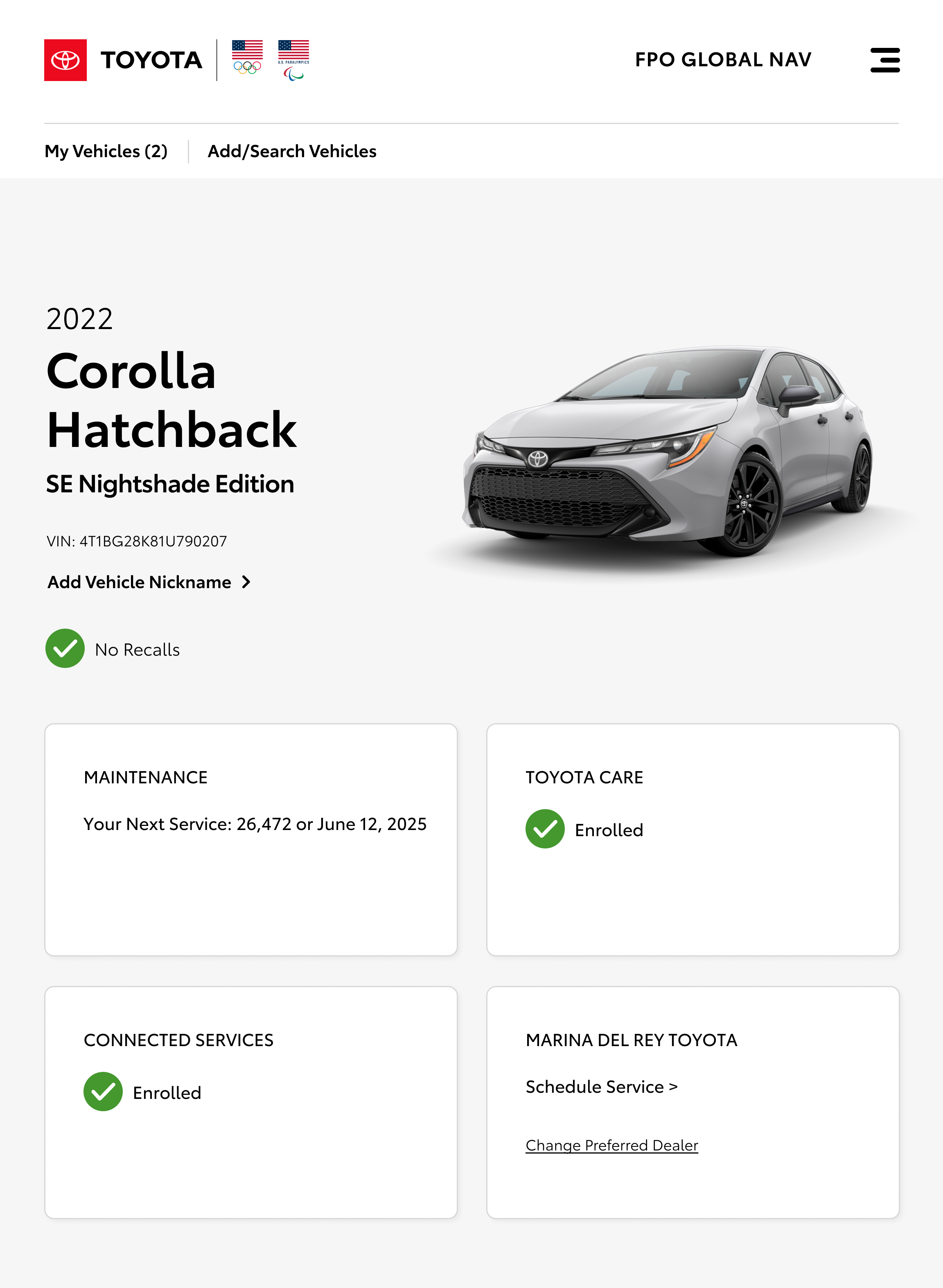
Desktop
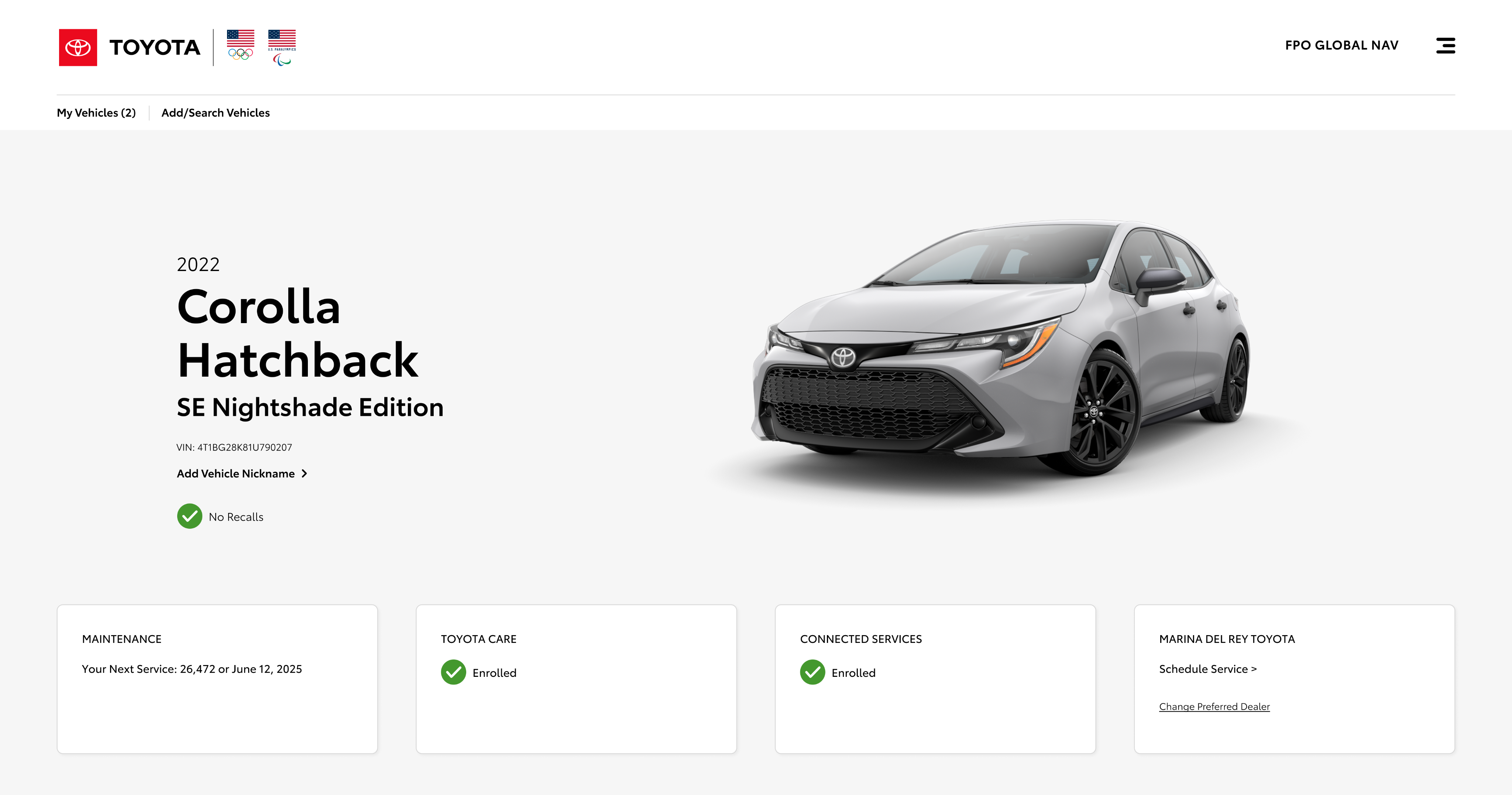
Quick Tools Menu
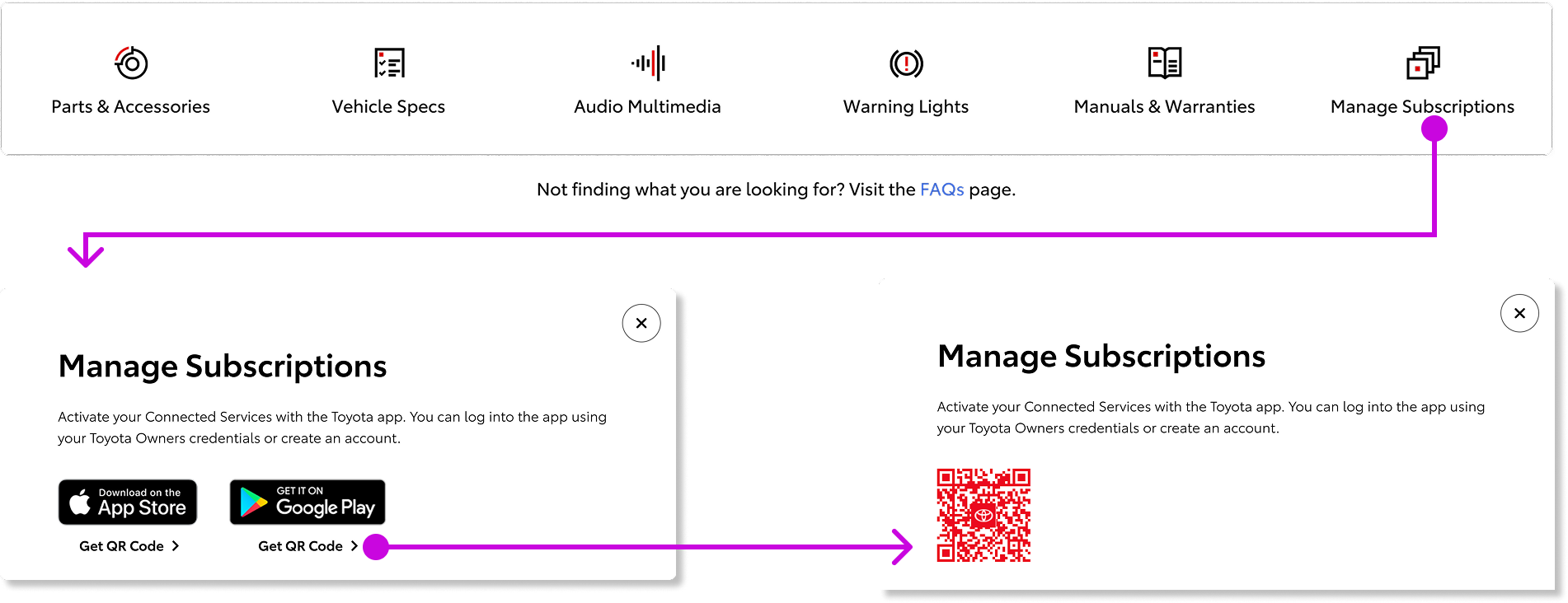
The Resources section of the current site had low engagement — useful content that wasn't being found. Rather than cutting it or surfacing it in the main navigation, I consolidated these links into a Quick Tools Menu: a compact, on-page component that keeps them accessible without competing for attention. Key decisions include:
- App Subscription Management: Managing subscriptions requires the mobile app, so App Store and Google Play links on desktop go unused. I replaced them with a QR code generator that sends users directly to the relevant page on their phone.
- VIN-Entry Modal: When users click 'Vehicle Specs' without a VIN entered, a VIN-Entry Modal opens inline so they can provide it without leaving the page.
- Iconography: Working with the visual designer to create new iconography for Parts & Accessories, Audio Multimedia, Warning Lights, and Manuals & Warranties.
Vehicle Health Report
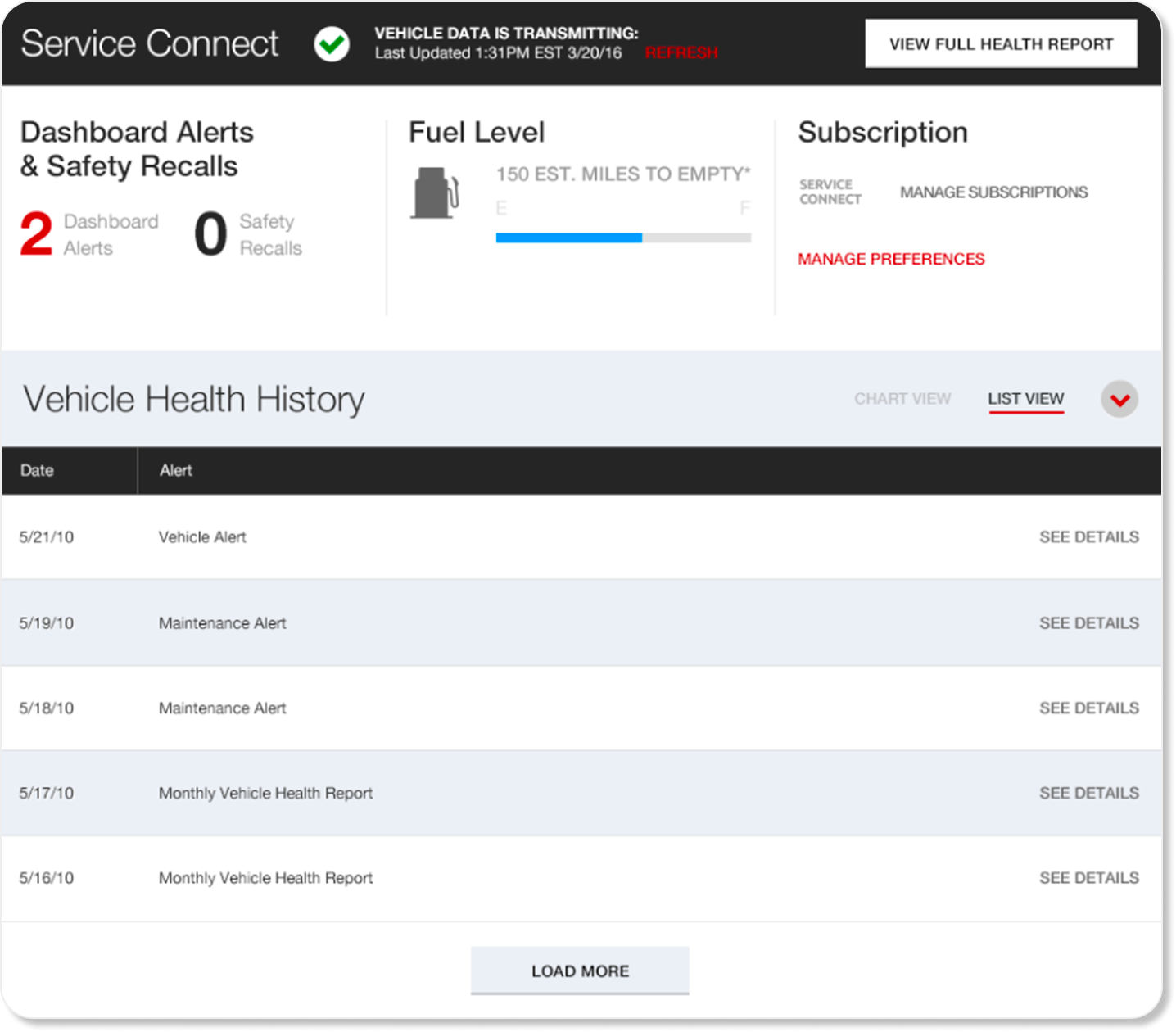
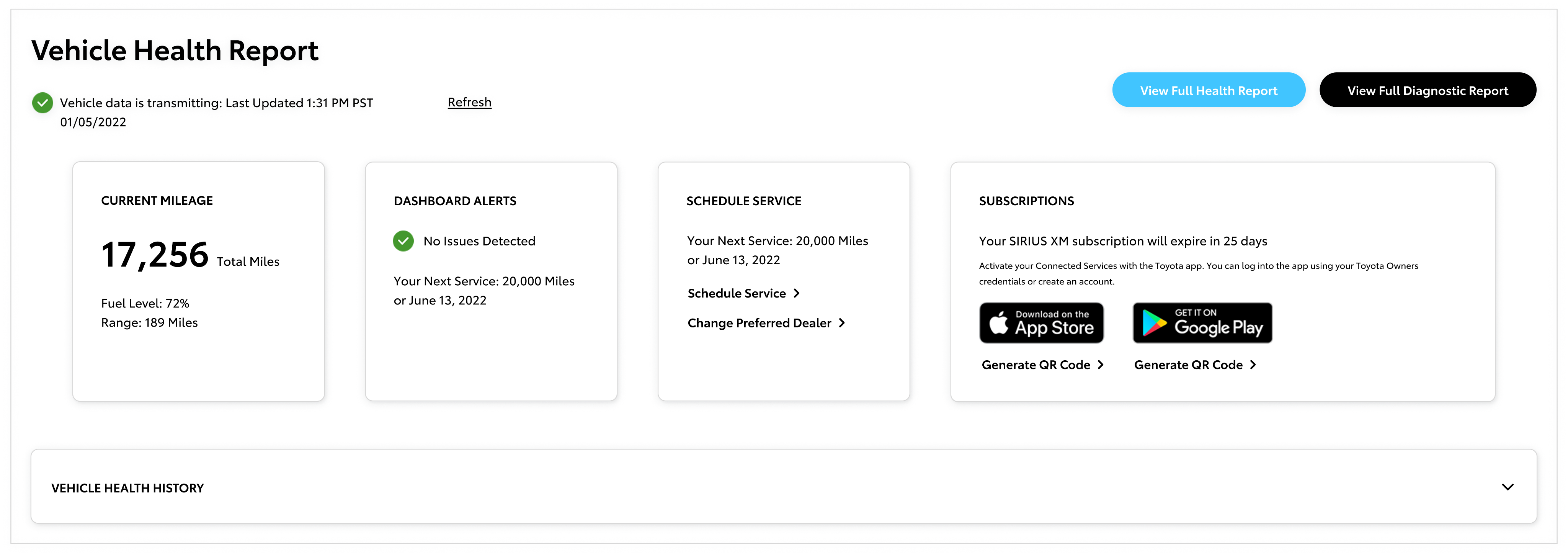
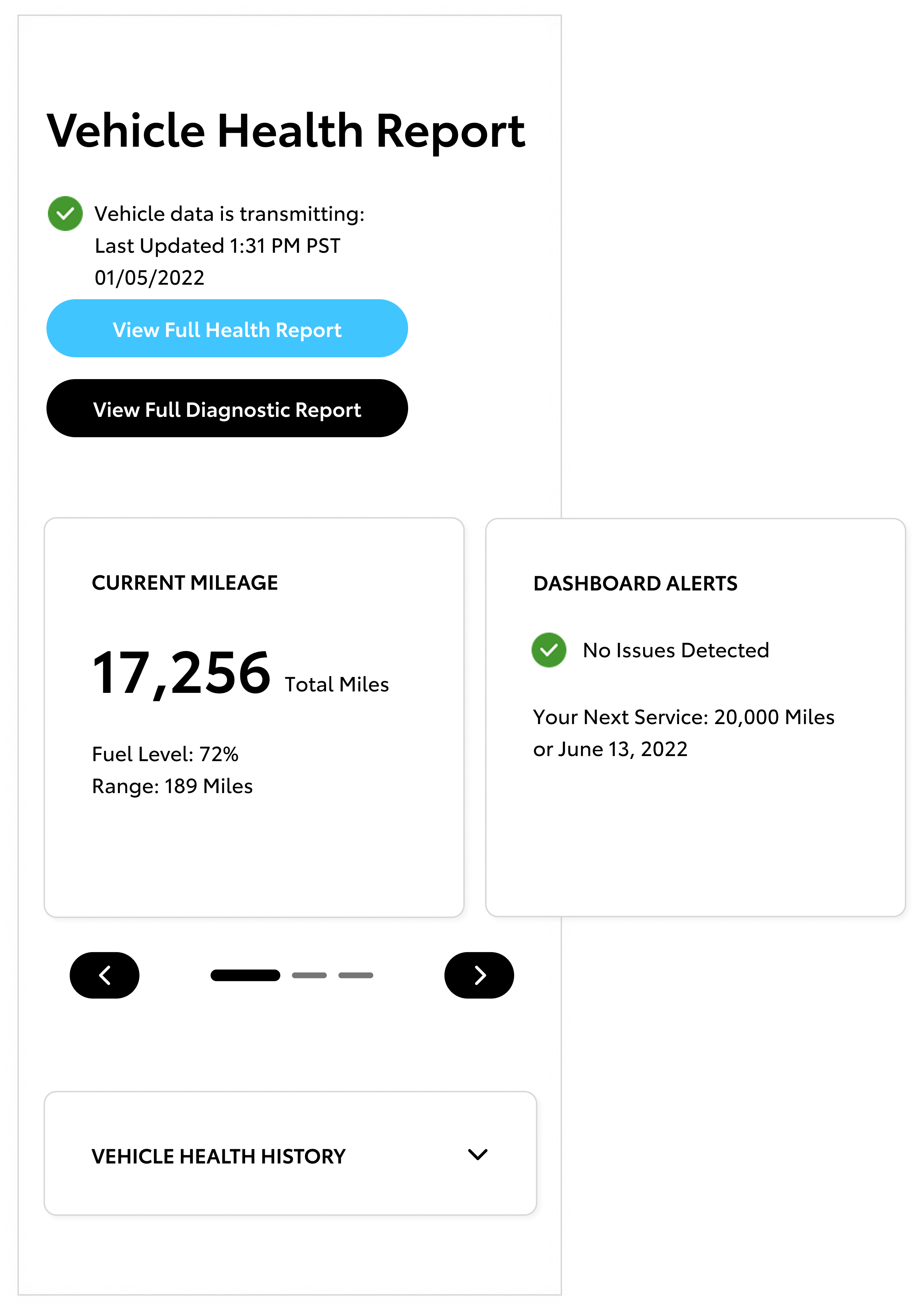
The Vehicle Health Report (VHR) gives owners a clear read on their vehicle's condition — surfacing the information that matters most, from dashboard alerts and mileage to service status and subscriptions, without overwhelming them with raw diagnostic data. I redesigned it as a modular set of cards, each pulling from an independent data feed, so the component can scale as Toyota's telematics capabilities expand. Key revisions include:
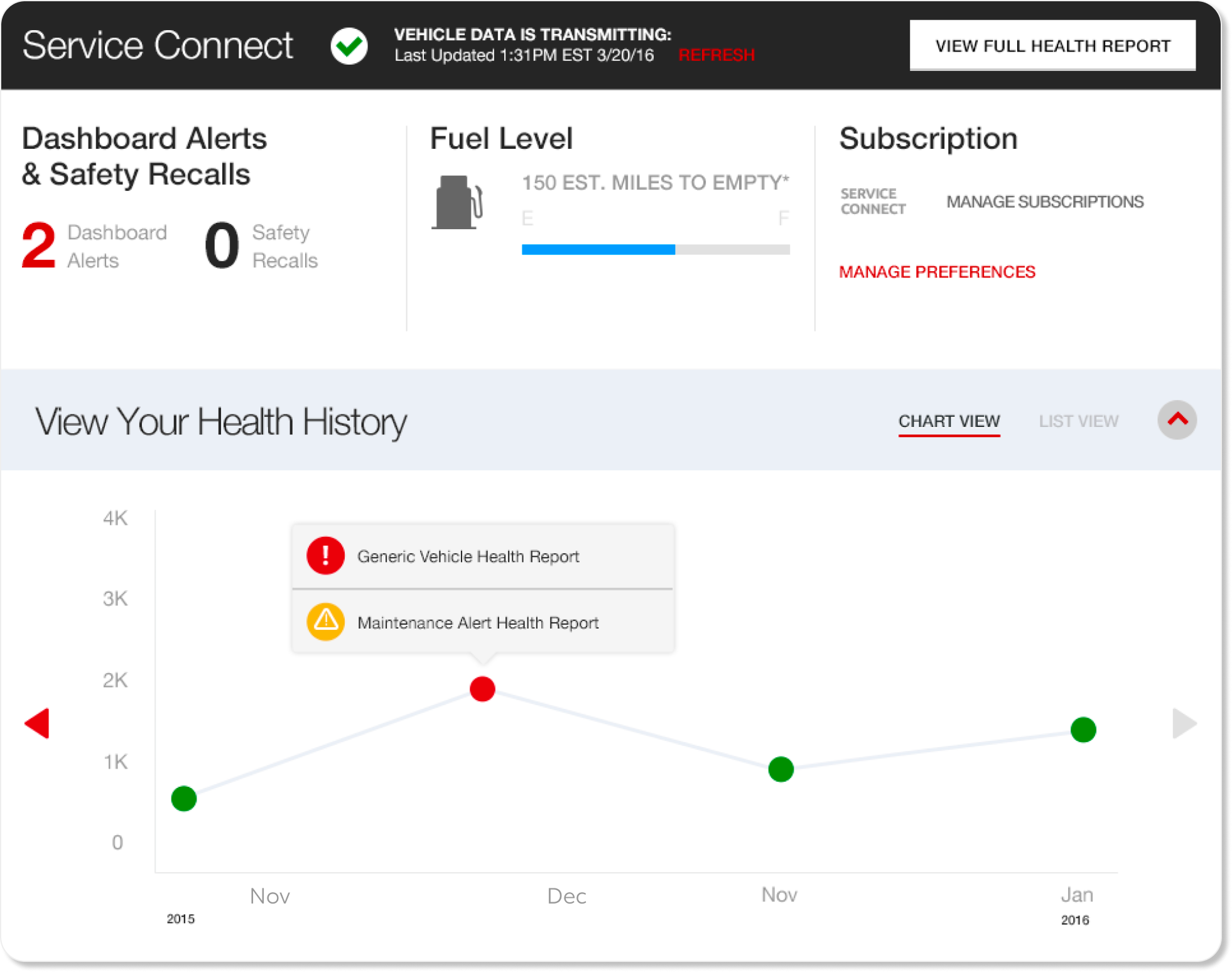
- Graph Removal: The original graph was ambiguous and posed potential ADA compliance issues, particularly at mobile breakpoints. The tool now defaults to a collapsed chart view.
- Dashboard Alerts as Cards: Alerts are presented as individual cards that clearly identify the type of issue and direct users to the appropriate page for resolution, replacing generic messaging.
- Schedule Maintenance Card & CTA: A top user priority and key dealership revenue driver per the product team, this card provides direct access to scheduling maintenance.
- Horizontal Scroll Layout: Lets the component show more services without adding vertical height.
The comparison below shows the current production version alongside the redesign — the shift from a graph-heavy layout to a modular card structure is the most visible change.
Page Layout: High Fidelity Visual Treatments
Full Page Layout
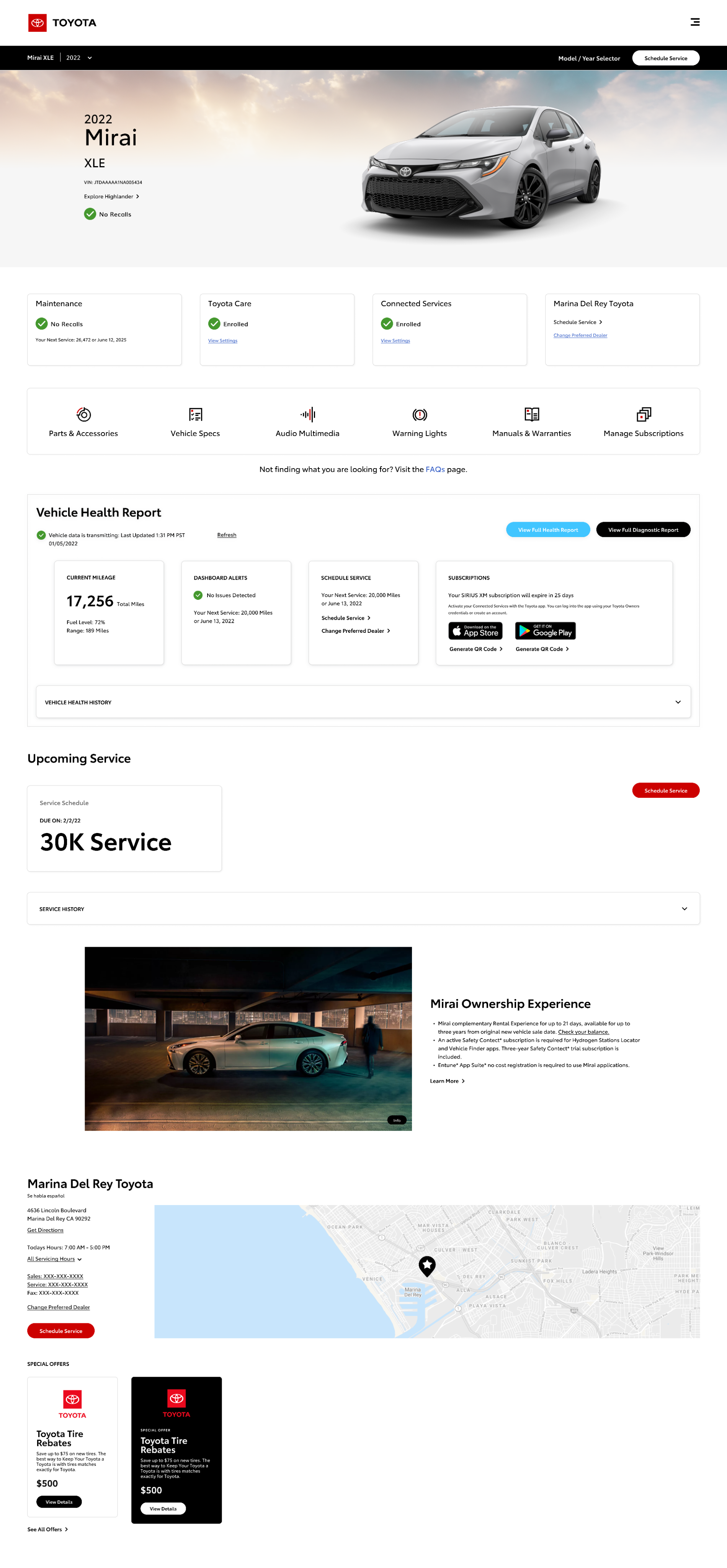
I designed each component independently across five breakpoints — from Mobile to Desktop XL — and provided detailed annotations for functionality and technical requirements before handing them off to the Visual Designer for stylistic refinement. Following this handoff, we collaborated closely to iterate on the designs based on stakeholder feedback and evolving scope.
This example illustrates the full page layout for a user with a VIN-entered vehicle enrolled in Connected Services. All other use cases are variations of this layout, with each component adapting dynamically to the user's state and available data.
- Marquee and Sub-Marquee: Worked with the Visual Designer to ensure 3-up and 4-up card variations hold across all breakpoints — accounting for vehicle name/trim spacing, image variations, card count per use case, and recall status visibility.
- Quick Tools Menu: Consolidated all Model/Year-specific links into a single on-page source, reducing redundancy in the main nav.
- Vehicle Health Report (VHR): Modular card structure scales as Toyota's telematics capabilities expand.
- Service History: Redesigned to simplify manual entry of service instances, especially for users visiting non-Toyota dealerships.
- Contextual Promotional Content: Promotions display conditionally using an existing pattern, appearing only when relevant without disrupting the layout.
- Servicing Dealer: While dealership meta-data feed remained fixed, I added a Google Map integration based on analytics showing ~60% of users access this page on mobile.
Post-MVP
Though the project shifted from the original plan, the clients have remained receptive throughout. We had proposed reconciling global navigation before launching new pages, but the team pivoted — and the Dashboard direction is now well-defined. Designing the page modularly means components can be added or changed as the experience evolves, giving the work a longer shelf life regardless of how priorities shift.
- User Testing: I developed a user testing plan covering Dashboard components, navigation structure, and naming conventions.
- Map Consolidation: Four separate dealer maps exist across the Owner experience — I recommended consolidating them into a single, faceted map.
- Global Navigation: Competitor research revealed no clear standard for integrating the Owner space into global nav, so I proposed building and testing several models with users.
- Logged-Out Experience / Benefits of Ownership: With the extended timeline, the future launch will include the Logged-Out experience.
By proactively addressing these areas, we can improve usability, reinforce ownership value, and set the foundation for a more cohesive digital ecosystem at launch.
Conclusion: Reflecting on the experience
What this project reinforced is that the most resilient design decisions account for organizational change — not just user needs. By building the Dashboard as a modular system rather than a fixed layout, the work stays useful as Toyota's roadmap evolves. The scope shifted, but the output didn't feel like a compromise. It felt like a foundation.