
Frequency Networks
Designing the Modern Broadcast Workflow (2023 – present)
Overview & Scope
Frequency builds Studio, an enterprise platform for managing 24/7 linear TV channels across FAST, OTT, and MVPD platforms. I've been a Senior UX Designer on the product team since 2023, designing an interconnected suite of tools that broadcasters use to ingest, schedule, monetize, and distribute programming.
Objective
Rather than focusing on a single feature, this case study follows the lifecycle through four projects. Content enters the platform through INGEST, gets programmed in SCHEDULE, and is managed in real time through LIVE. The final section covers an internal UX Workflow system I built to improve how our team designs and ships software.
Over the past three and a half years, I've helped evolve Studio for customers including BBC Studios, Hearst, Tegna, Sony Pictures, and Amazon MGM, designing new capabilities across a platform that supports more than 500 channels and 60,000 hours of programming a year.
My Role
- Role: Senior UX Designer
- Duration: 3.5 years
- Platform: B2B SaaS (browser-based, multi-tenant)
- Methods: User research, journey mapping, interaction design, prototyping, design systems, AI
Team Members
- Product Manager: Wrote project requirements, provided feedback, and coordinated with engineering
- Head of Design: Managed the design team, oversaw all design critiques, and provided high-level guidance
- Design Team: Two designers, including myself, who owned various projects across the platform
Ingest Content: Designing for Operational Clarity
Understanding the Workflow
INGEST is Studio's content intake pipeline, where assets from automated feeds and manual uploads are validated, processed, and prepared for scheduling and distribution.
The experience is organized into four views – Dashboard, Feeds, Videos, and Files – that support monitoring and troubleshooting throughout the ingestion process.
The Challenge
Before INGEST, operators relied on a legacy tool called PREPARE, where troubleshooting meant jumping between multiple systems with inconsistent workflows, limited filtering, and incomplete error reporting.
Because INGEST is every customer's first interaction with Studio, success was measured by reducing Aggregate Resolution Time – the time required to identify and resolve ingestion failures before source files expired after 90 days.
Designing the Solution
I built on interaction patterns already familiar to Studio users – filters, sortable tables, tabbed navigation, and consistent error messaging – while using pilot feedback to refine the experience. Operators identified assets differently, so I supported both GUID*- and name-based workflows, while prioritizing common troubleshooting needs like orphaned assets.
* GUID (Globally Unique Identifier) – unique system identifier for each asset.
Making Troubleshooting Faster
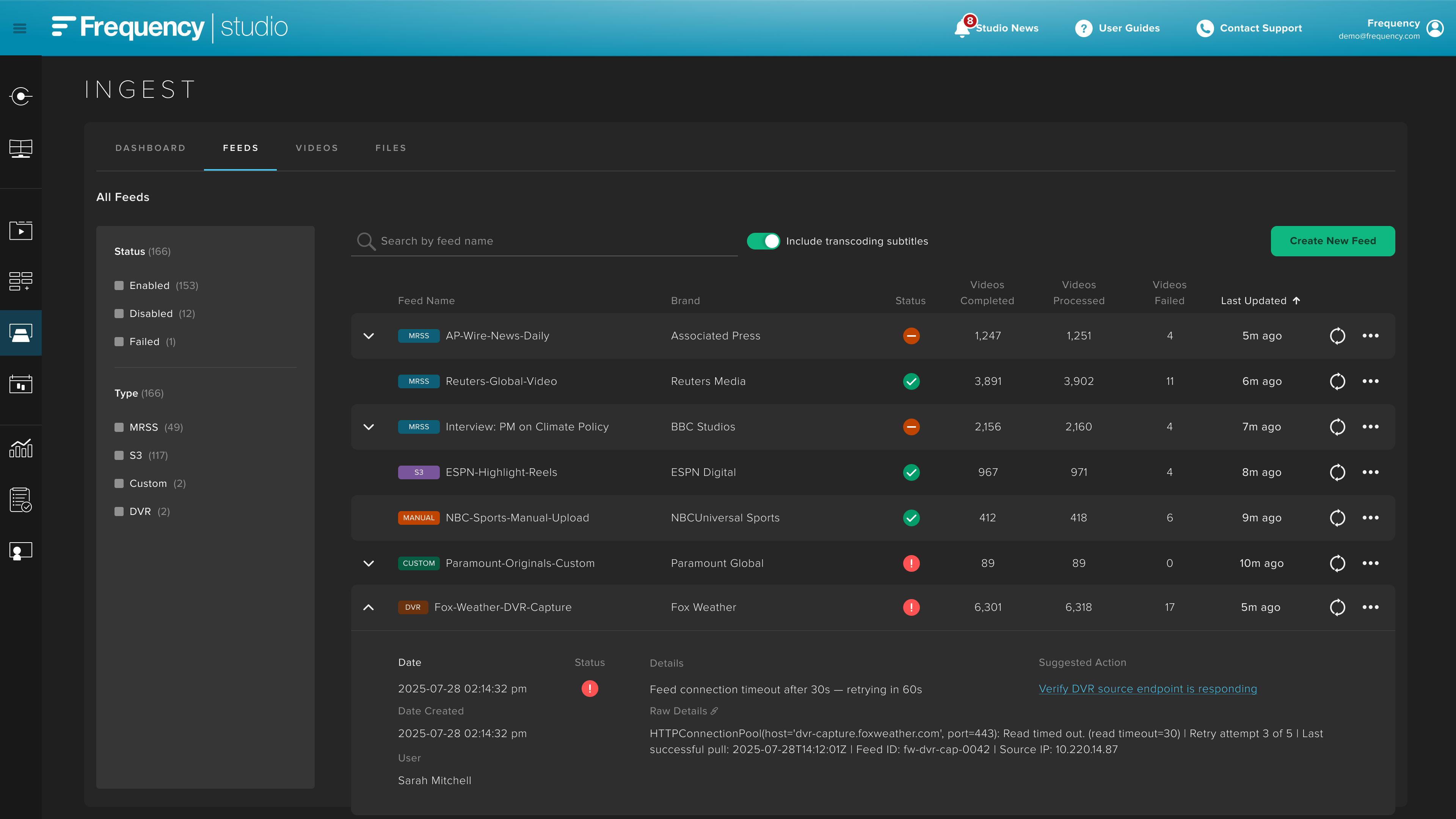
I carried the same health model, error taxonomy, filtering, and interaction patterns across every view in INGEST, giving operators a consistent experience whether they were monitoring a feed, inspecting a video, or troubleshooting a file.
The Dashboard became more than a summary – it became the starting point for investigation. Each metric deep-links into a filtered workflow, while a structured error taxonomy (System, Artwork, Metadata, Subtitle, Video, and Feed Item) gives operators immediate context instead of the generic validation failures shown in the legacy tool.
Simplifying Asset Health
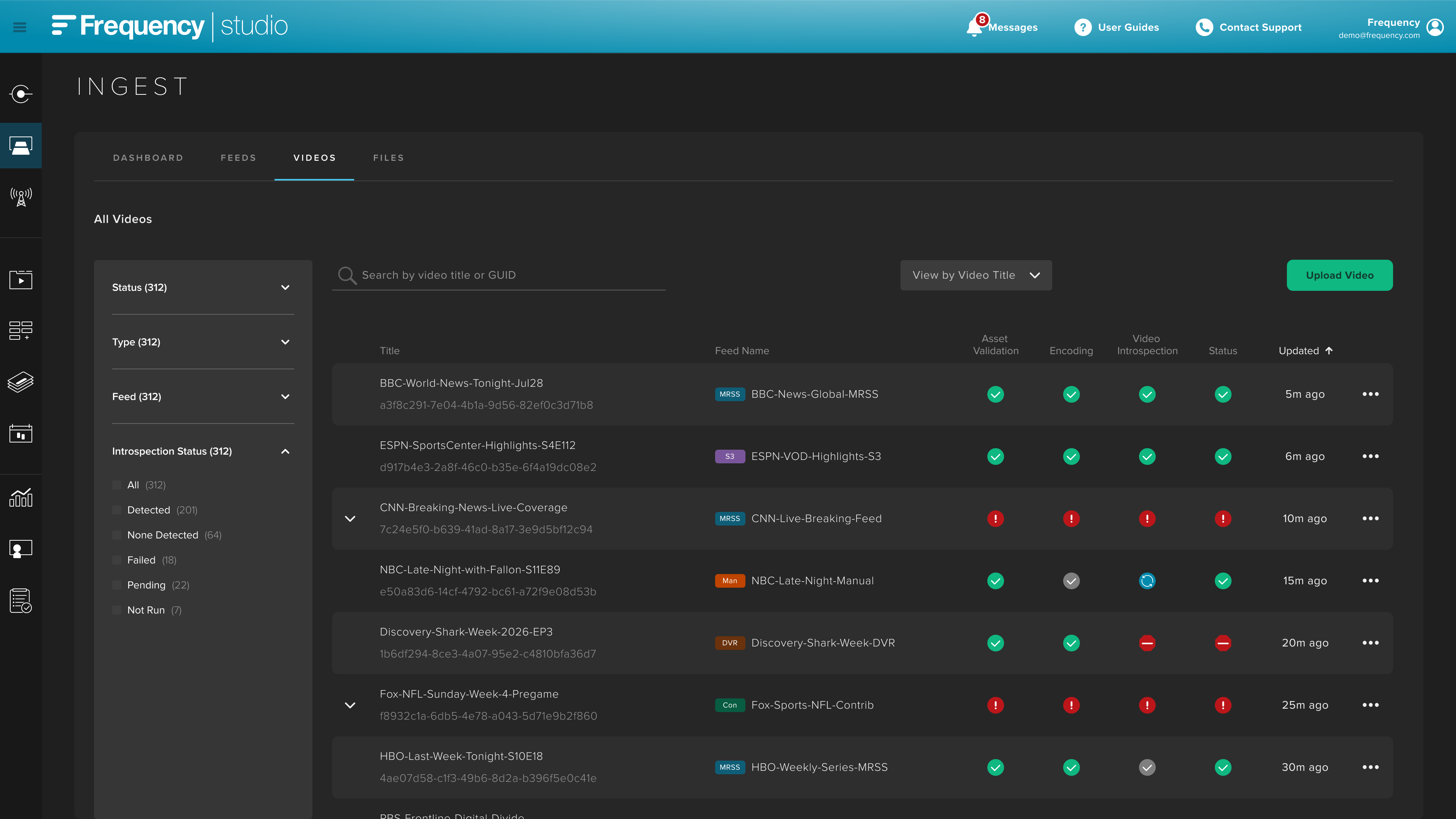
Operators spend most of their time scanning tables, not reading them, so I designed the experience to make asset health recognizable at a glance.
Each asset is validated across multiple components – video/audio, subtitles, artwork, metadata, and more. Rather than displaying the status of every component in its own column, I consolidated them into a single health indicator with four states: Failed, Processing, Stopped, and Passed. Hovering reveals the status of each individual validation check, preserving detailed information without overwhelming the table.
To support different troubleshooting workflows, operators can search, filter, sort, and switch between asset names and GUIDs.
Outcome
Unlike many portfolio projects, INGEST didn't end when it launched. I've remained the primary designer since 2023, evolving the product through multiple releases that introduced new ingestion types, partner connectors, licensing metadata, scalable filtering, and AI-assisted ad-zone detection while maintaining a consistent experience.
One example is the LockedOn (Tegna) Custom Connector, which automatically detects ad breaks and generates linear programming without manual scheduling. Launched across four regional channels – Dallas, Atlanta, Cleveland, and Los Angeles – it demonstrates how improvements to INGEST extend beyond content intake to power automation throughout Studio.
Schedule Blueprint: From Strategy to Schedule
Understanding the Workflow
Blueprint lets operators define a channel's identity, audience, content strategy, and scheduling rules in natural language, creating the foundation AI uses to recommend and eventually automate programming decisions. I was the lead designer for Blueprint, one of three components in Frequency's broader AI Scheduling initiative.
The Challenge
Every channel already had a blueprint, but it lived outside Studio, leaving operators to manually translate programming strategies into schedules. As one told us, "If you set it and forget it, it will die" – Blueprint brought that strategy into Studio as a living document that operators and AI could continuously refine.
Research
Research with the MCS scheduling team revealed a highly manual workflow – operators analyzed performance data in spreadsheets and could spend weeks planning and building a channel schedule. We also found that existing Program Templates rarely fit real-world content, shifting our focus from generating schedules to capturing the programming strategy operators were already creating by hand.
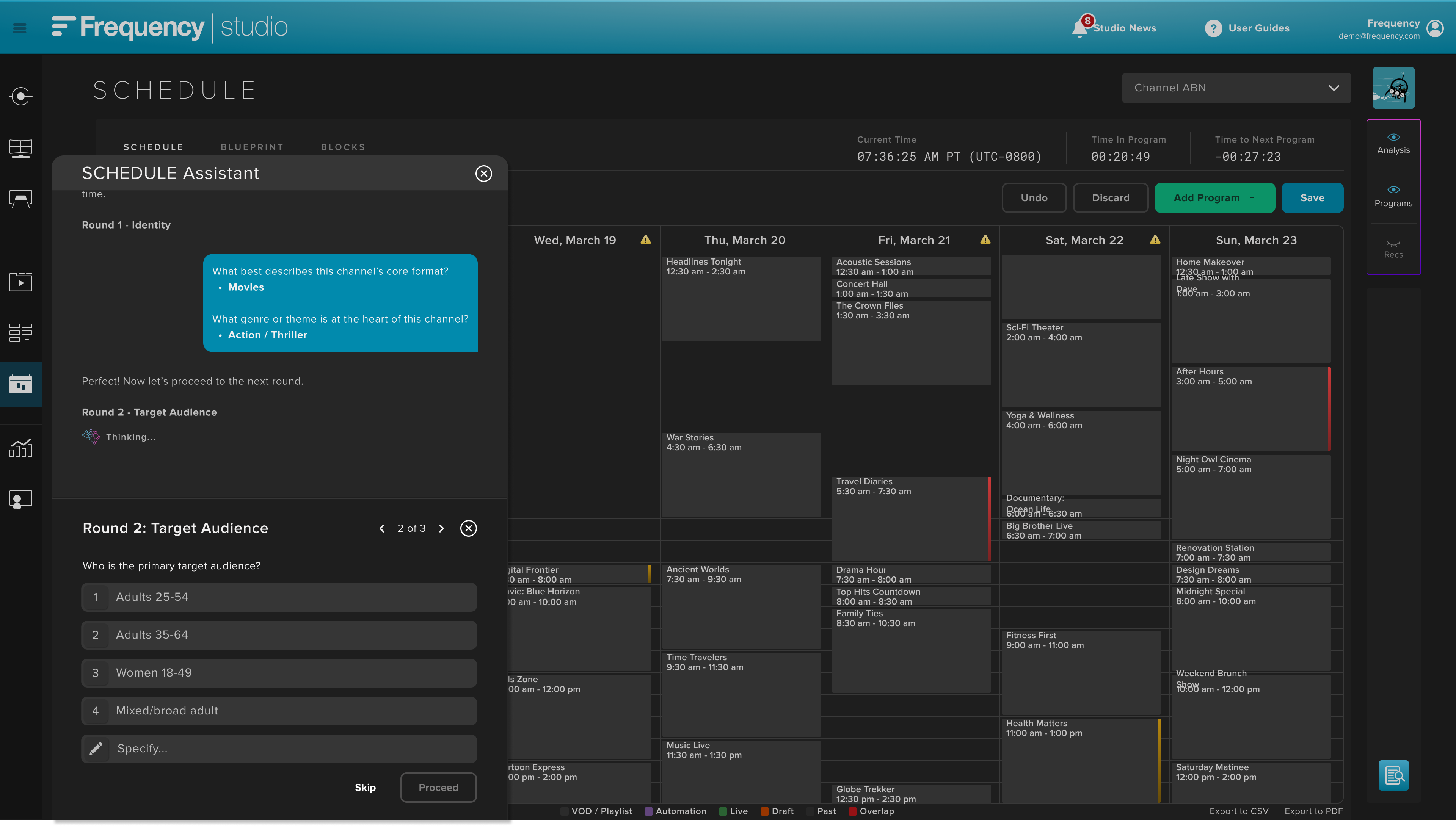
The product manager built an early agentic prototype in Claude to test the concept. I adapted that prototype to Studio's design patterns, with operators launching Blueprint from SCHEDULE and completing the workflow through a global AI Assistant.
Defining Success
We partnered with Sony Pictures Television to pilot the project and establish measurable goals for AI-assisted scheduling:
- Schedule Acceptance Rate: ≥85%
- Time Savings: ≥80% compared to manual scheduling
- Minutes Watched: +20%
- Session Time: +15%
Map the Mental Model
Through customer interviews, industry research, and partner examples, I defined the core structure of a channel blueprint, which became the foundation of Blueprint's information architecture.
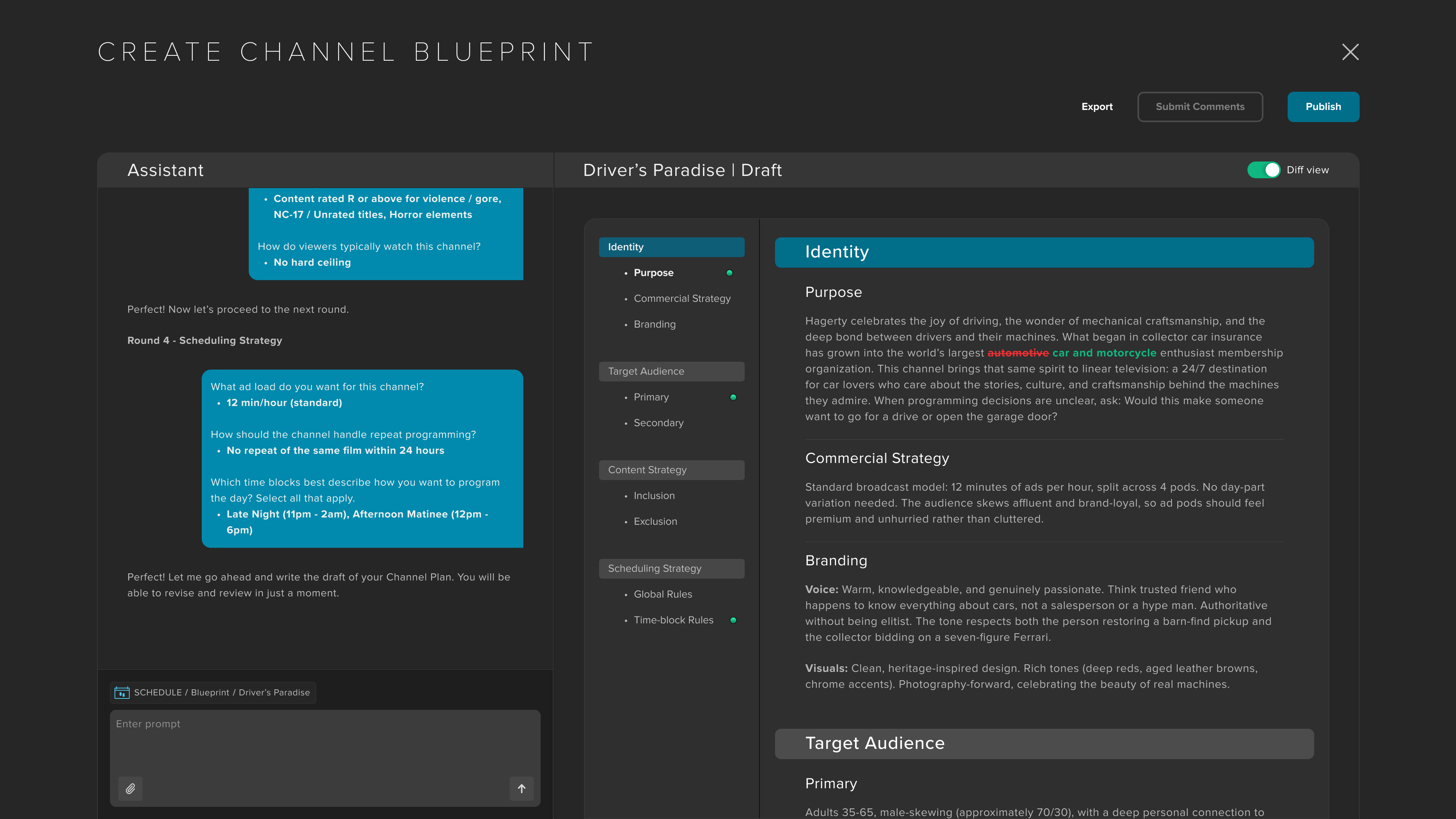
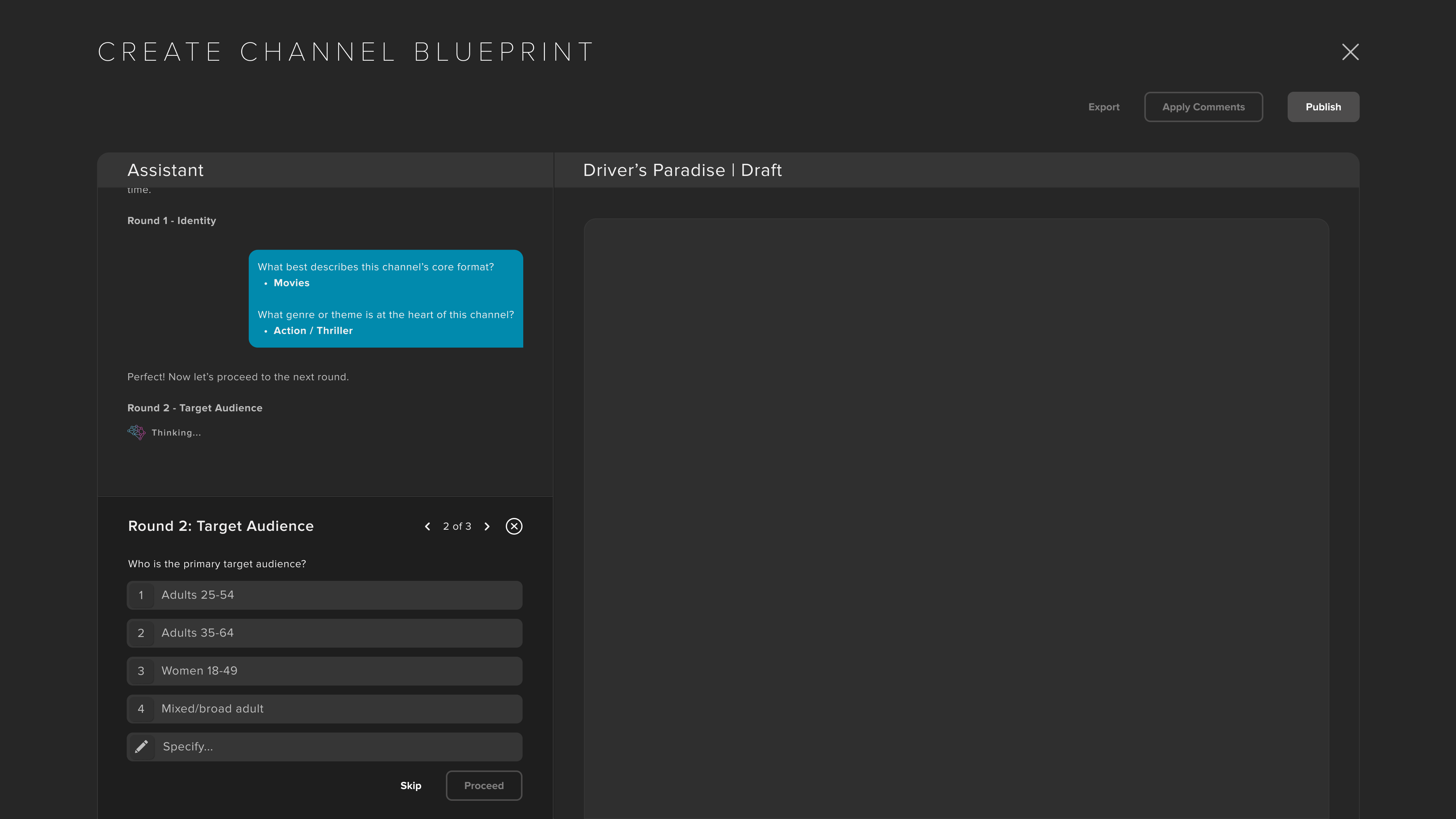
When technical constraints moved Blueprint out of the standalone AI Assistant, I recommended keeping creation and editing within a modal launched from SCHEDULE, while the published Blueprint lives in its own tab as a persistent part of the scheduling experience.
Defining the Creation Flows
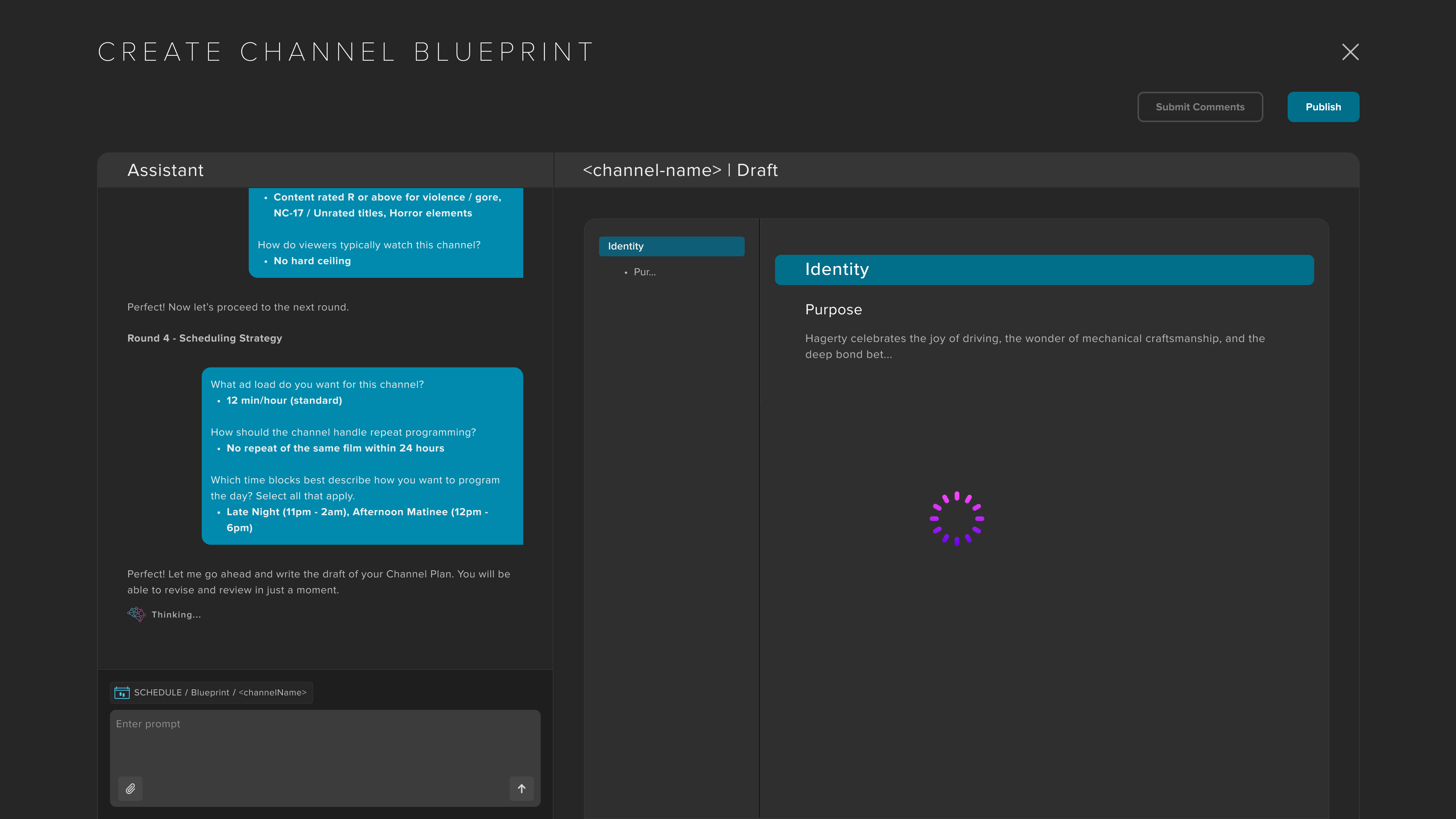
Research identified three ways customers might create a blueprint: generate one from an existing schedule, build one from scratch, or import an existing strategy document. Rather than designing separate workflows, I created a single adaptive experience that pre-fills or skips questions based on the information provided, giving every customer the same starting point regardless of how much they already had.
Once the questionnaire was complete, the agent generated the Blueprint in the canvas next to the chat.
Designing the Review Experience
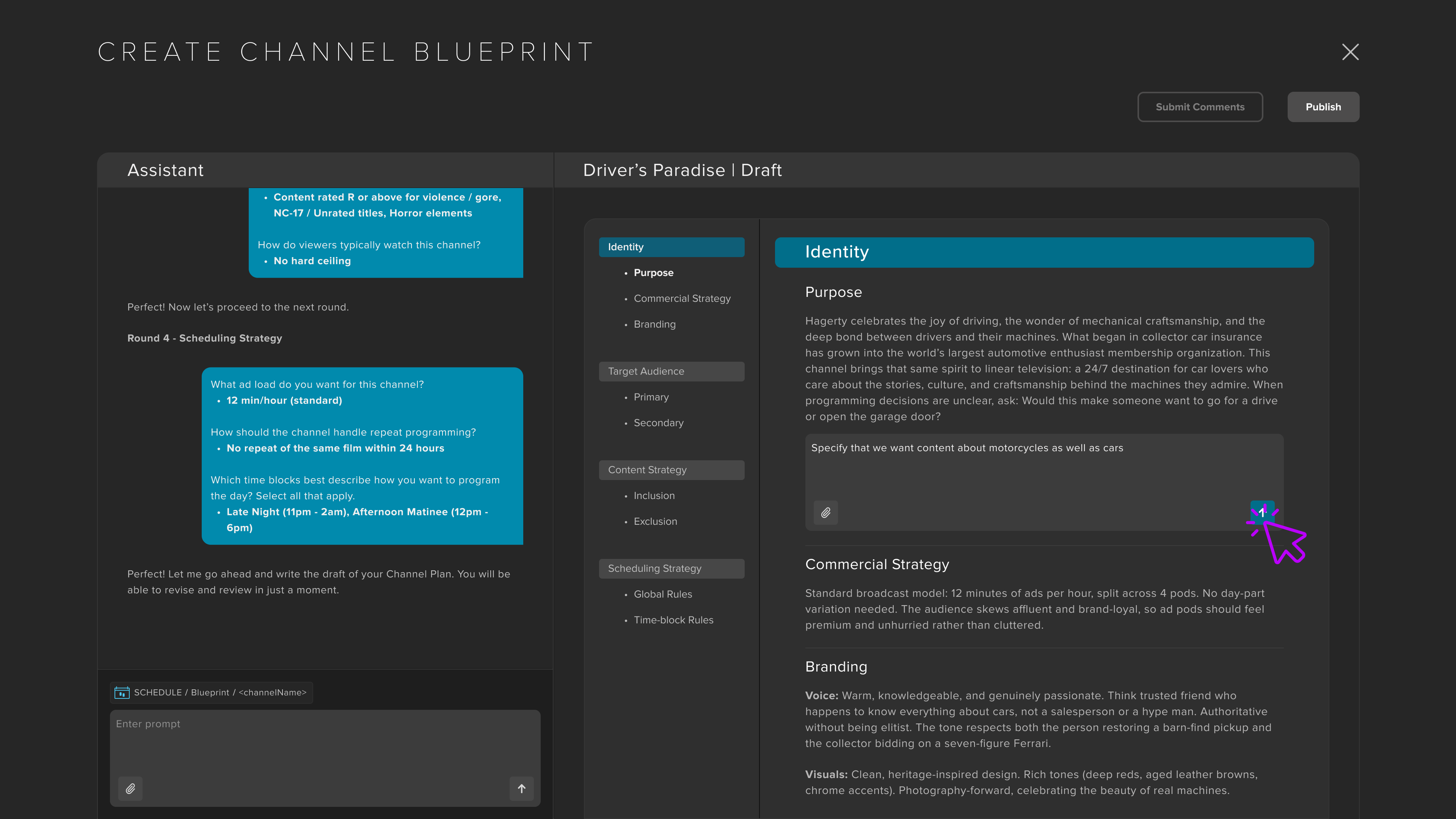
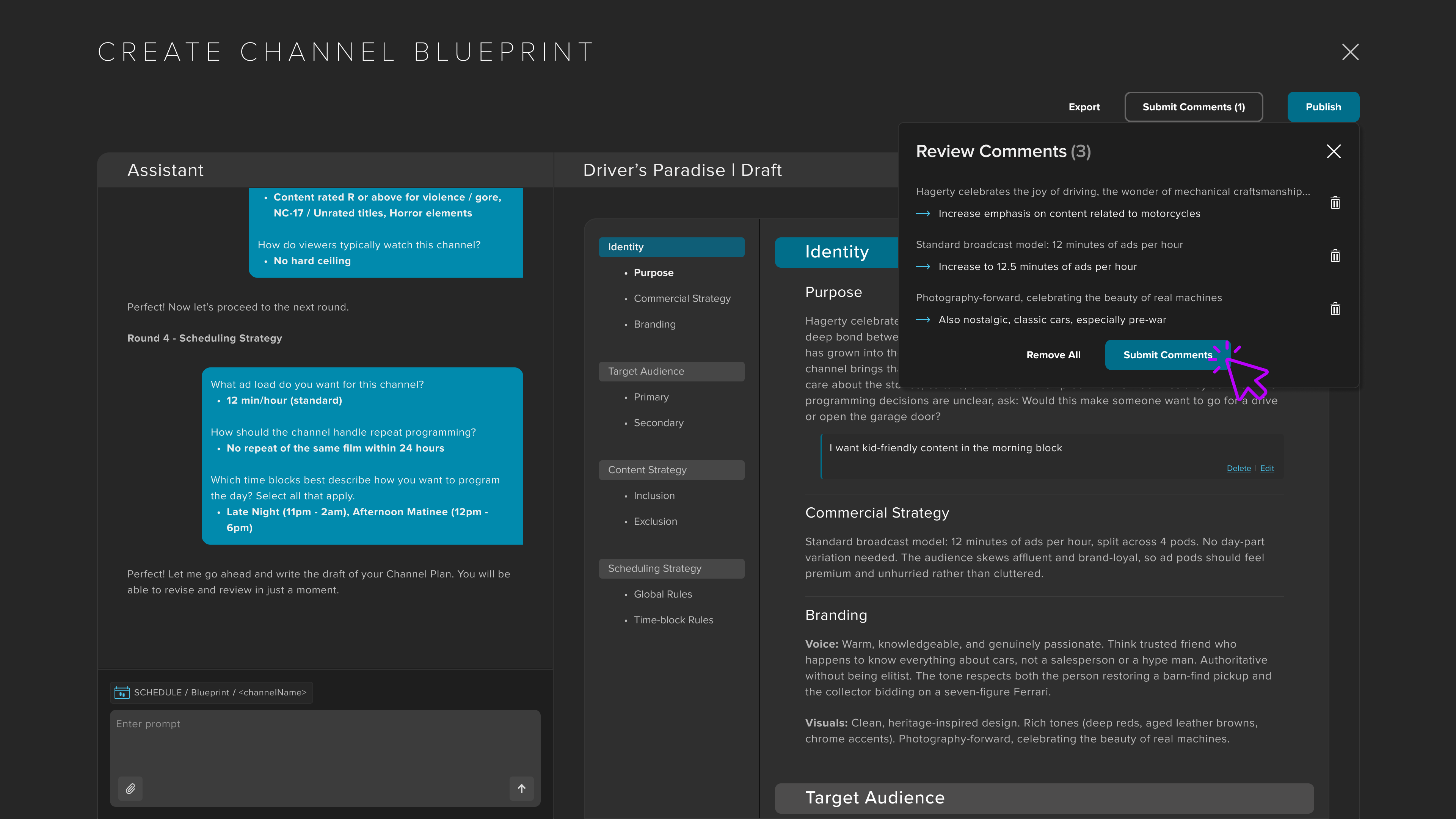
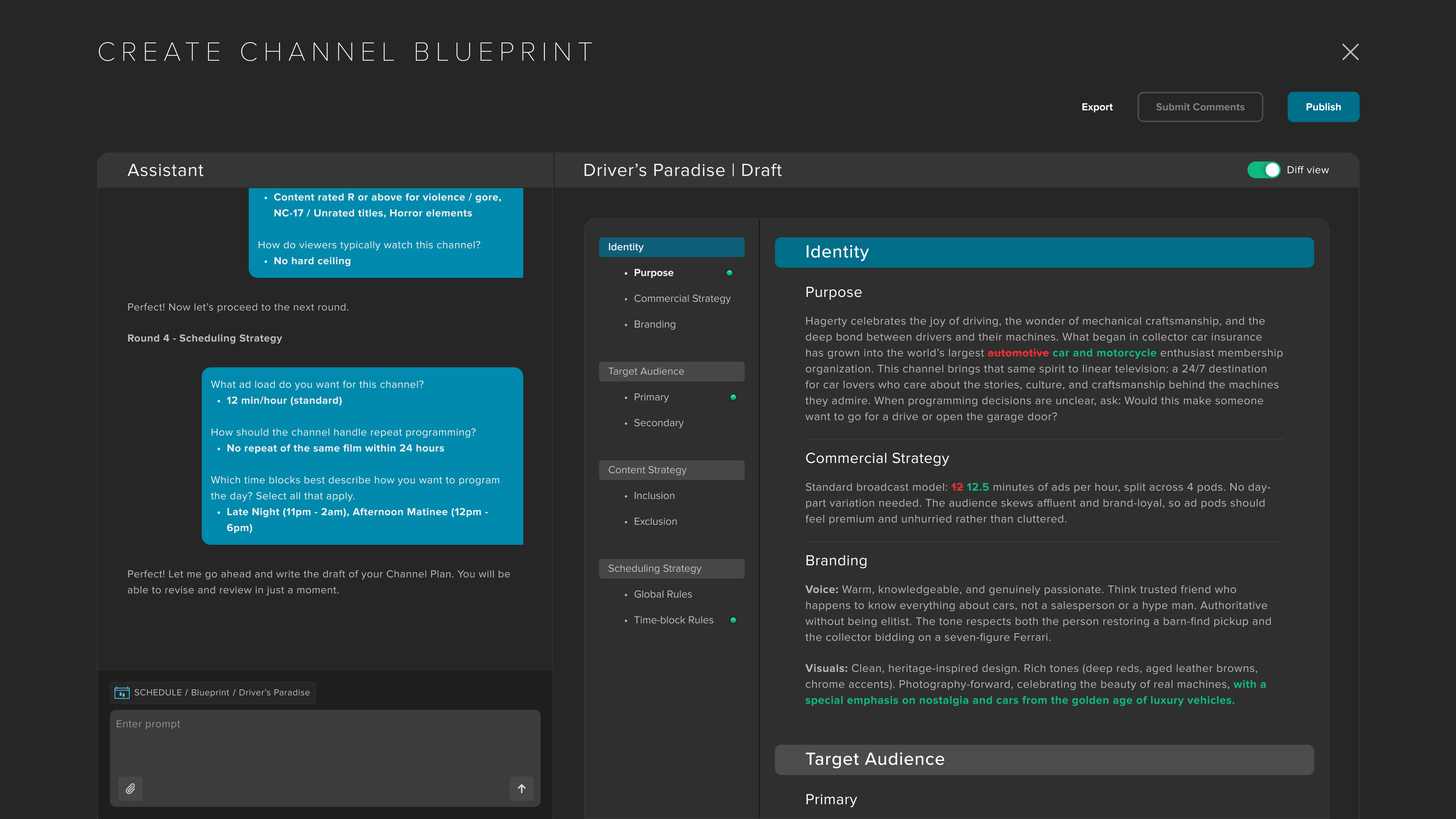
Operators refine the Blueprint by leaving comments directly on the document, then applying them as a group.
I initially designed edits to regenerate individual sections, but engineering identified dependencies across the document, so we shifted to regenerating the Blueprint as a whole to avoid conflicting directions.
- Comment: Add feedback directly to any section of the Blueprint.
- Apply: Regenerate the full document using all feedback at once.
- Review: Changes are highlighted with a before-and-after diff and saved as a new version.
- Publish or iterate: Publish the Blueprint to SCHEDULE or continue refining it.
Once published to Studio, the agentic engine will be able to provide scheduling recommendations and auto-generate programming.
Iterating on the Product
From AI Assistant to Core Workflow
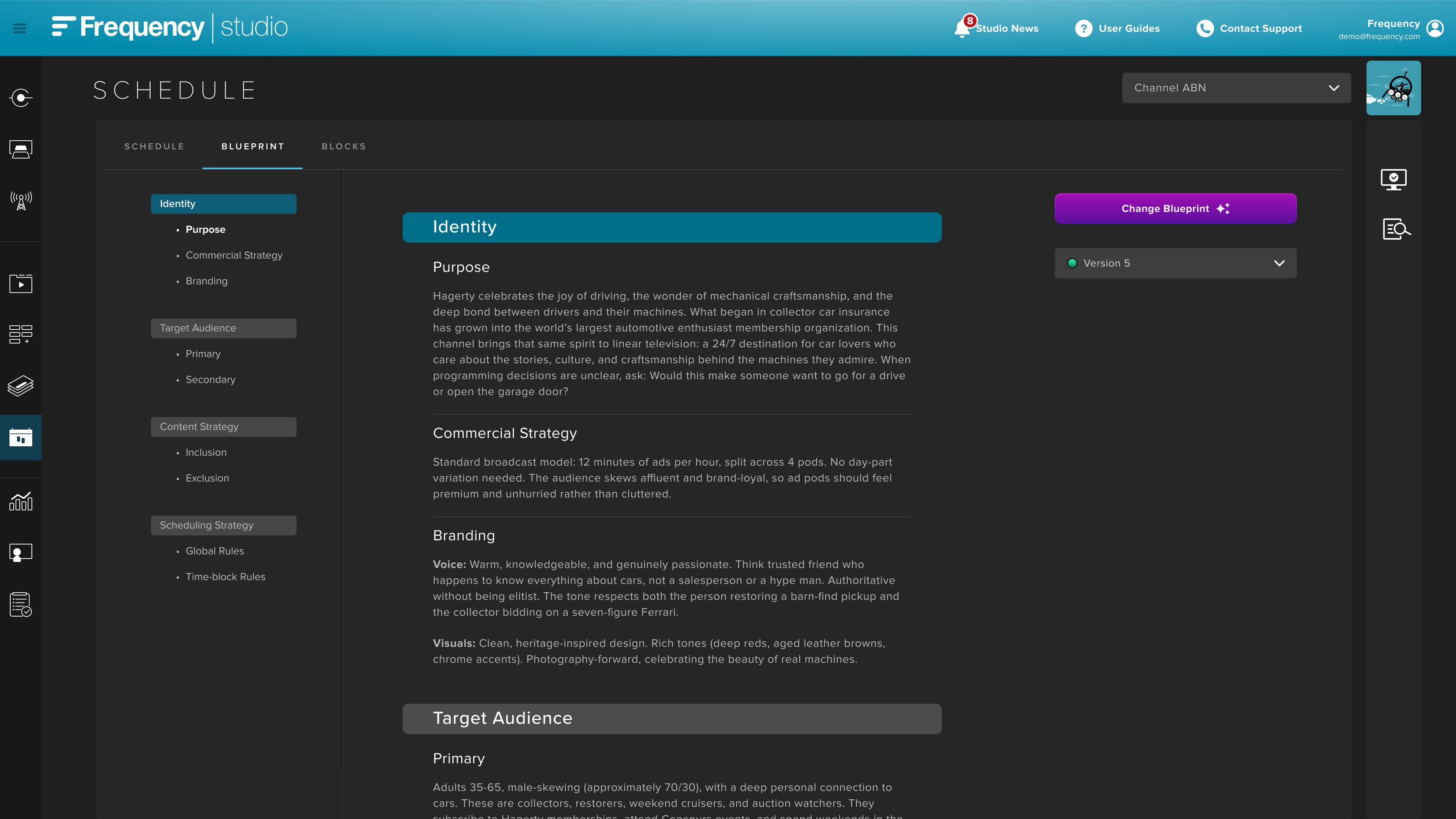
As Blueprint evolved into the central artifact for AI scheduling, I recommended integrating the published document as a dedicated tab within SCHEDULE. This kept it persistent and accessible without introducing a separate workflow or significantly restructuring the existing interface.
Improving Readability
After the NAB 2026 demo, stakeholder feedback revealed that Blueprint was difficult to scan and navigate. I used that feedback to redesign the document around:
- Clearer hierarchy and collapsible sections for easier scanning
- Sticky navigation with active-section tracking
- Consistent rendering across creation and published views
- Version awareness with scroll-position preservation
- Meaningful empty states for incomplete sections
Outcome
Blueprint became the centerpiece of Frequency's AI Scheduling demo at NAB 2026, with stakeholder feedback leading directly to funded follow-on work. Although still pre-launch, the information architecture and interaction model I designed have become the foundation for Frequency's broader AI scheduling roadmap, including subsequent Intelligence Layers and Autopilot initiatives.
Live: Designing for Operator Confidence
Understanding the Workflow
Studio LIVE is Frequency's browser-based control room for monitoring feeds, switching sources, inserting ad breaks, recording segments, and managing live broadcasts. Supporting more than 6,500 newscasts and 8,300 sporting events each year, LIVE is designed for operators working in real time, where speed, reliability, and confidence are critical.
The Challenge
Moving live broadcasting to the cloud meant replacing the certainty of dedicated hardware with software, changing how operators prepared sources, switched broadcasts, and recovered from failure. Three challenges emerged:
- Faster ad hoc switching – An unscheduled source could take nearly three minutes to come online because receiver provisioning didn't begin until the switch was initiated.
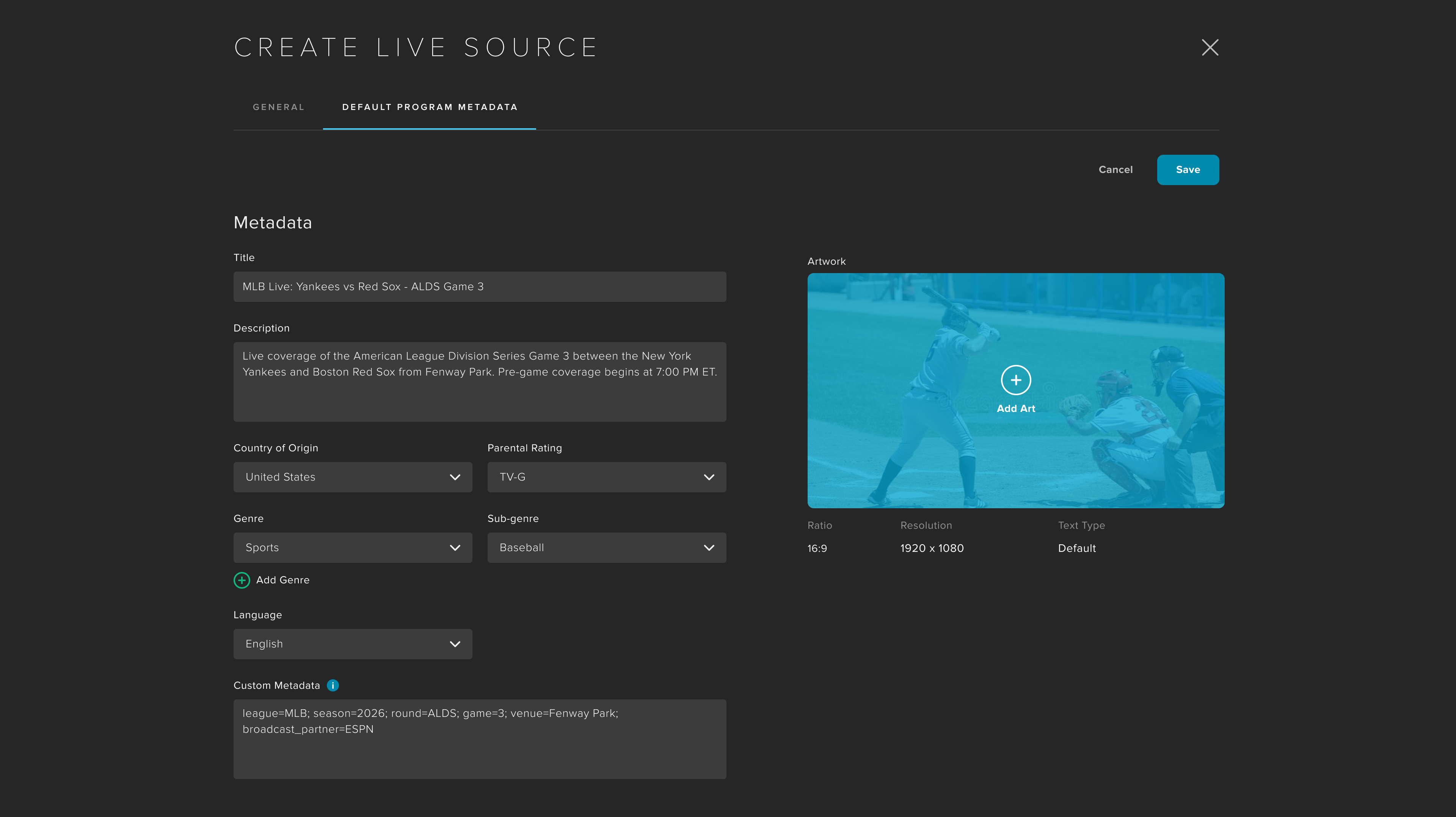
- More flexible source configuration – Live source metadata and configuration needed to evolve to support new capabilities, including both scheduled and unscheduled live events.
- Predictable failure recovery – Operators needed a clear recovery path when something went wrong, from automatic failover to backup content, manual intervention, and ultimately support.
Designing for Operator Confidence
Make System States Visible
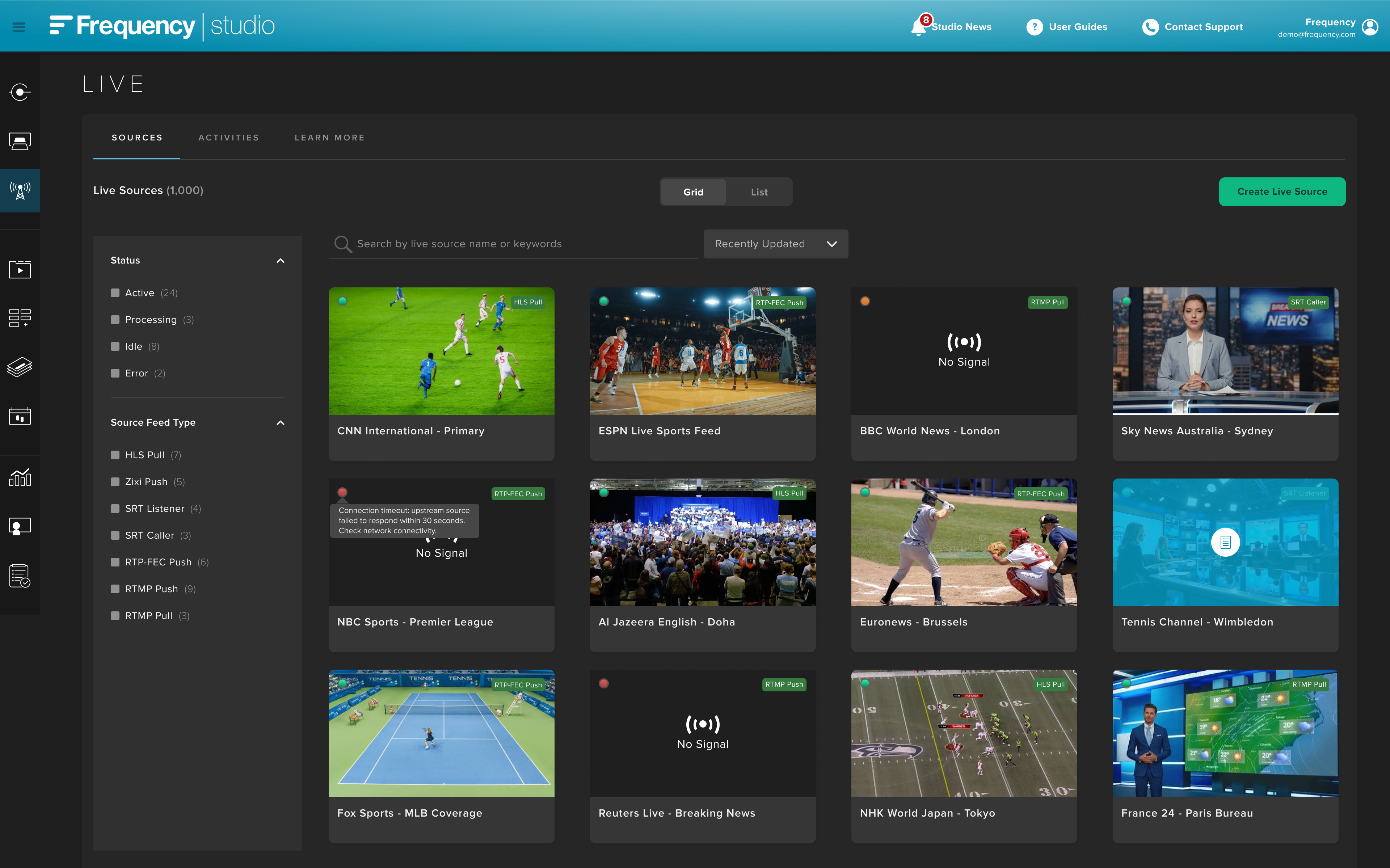
Operators need to understand the state of every live source at a glance. I translated the broadcast lifecycle into four distinct states – Idle, Warming, Ready, and Live – each with a unique icon so operators could quickly identify which sources were prepared for air.
To support different monitoring needs, I designed complementary grid and list views. The grid provides a control-room overview for scanning source health and spotting issues quickly, while the list surfaces more detailed metadata and supports bulk actions. LIVE supports a wide range of broadcast protocols, but the interaction model remains consistent across them.
Design for the Unexpected
Ad hoc switching was one of LIVE's biggest usability problems. Because receiver provisioning didn't begin until a switch was initiated, an unscheduled source could take nearly three minutes to come online.
I separated preparation from execution. Operators can now warm receivers in advance, while Studio automatically prepares scheduled sources – reducing switching time to less than one second.
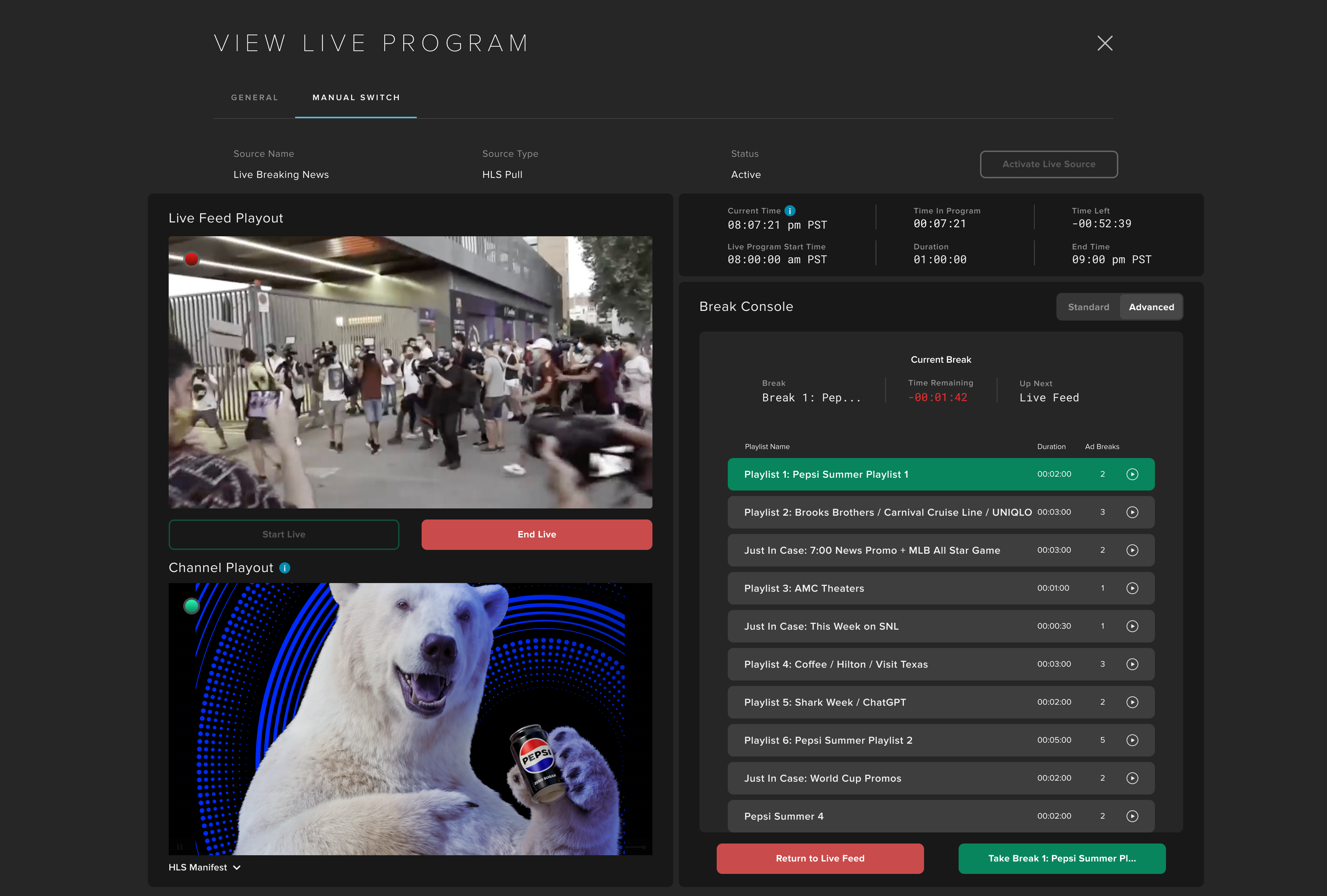
I applied the same thinking to failure, designing a clear escalation path from automatic failover to backup content, manual intervention, and support. I also gave operators the ability to assign curated ad break playlists to live broadcasts, providing greater control over what airs during commercial breaks.
Expand Operational Visibility
As LIVE matured, operators needed more than real-time visibility – they also needed a history of what had happened. I designed an audit log for LIVE that allowed customers to filter and review switching events, recordings, failures, and source changes.
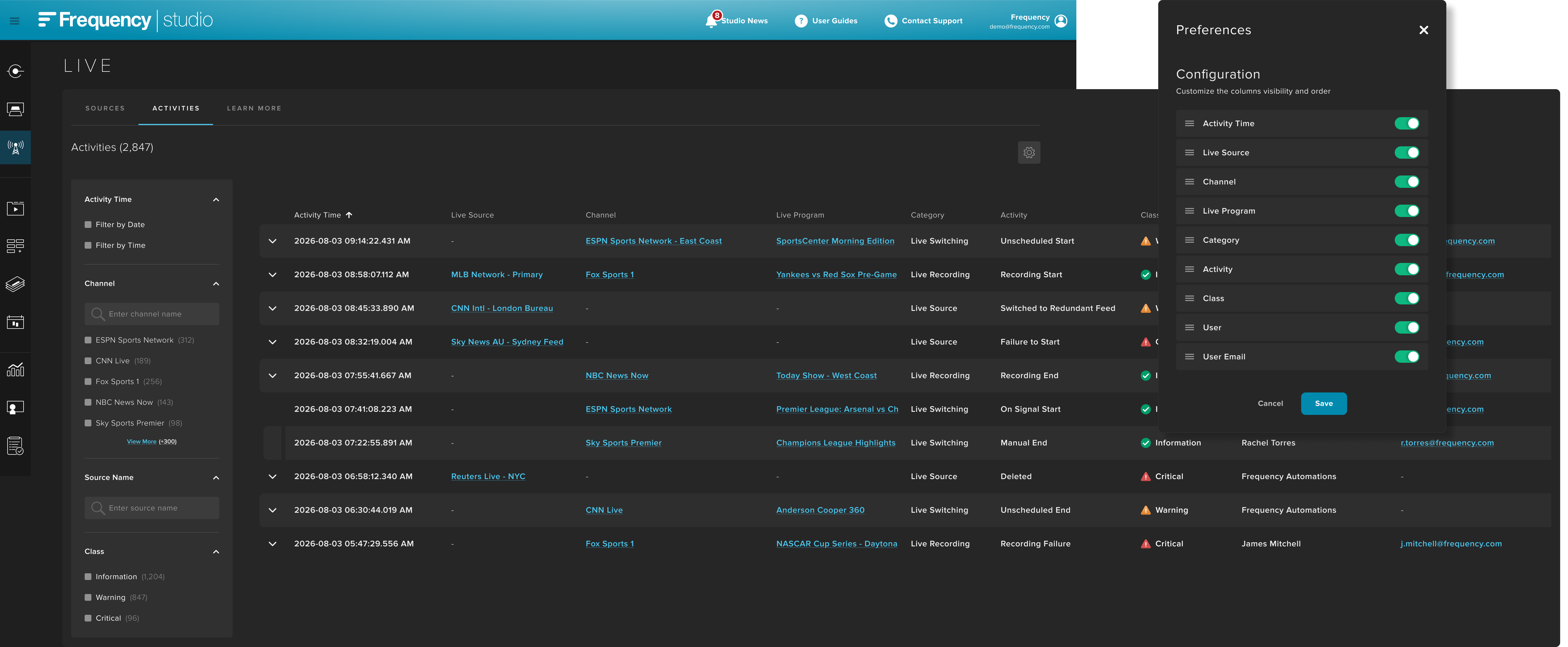
As Studio expanded, that work evolved into ACTIVITIES, a platform-wide tool spanning LIVE, INGEST, SCHEDULE, MANAGE, ACCOUNT, and GRAPHICS. To accommodate increasingly complex data, I introduced horizontally scrolling tables with customizable columns that users could add, remove, or reposition. What began as a broadcast audit trail became Studio's central system for activity history and administrative review.
Outcome
LIVE transformed one of Frequency's biggest competitive gaps into a mature cloud-based broadcast platform. By redesigning core workflows around preparation, visibility, and predictable recovery, operators could manage live events with greater speed and confidence.
One of the clearest improvements was ad hoc source switching, which dropped from nearly three minutes to under one second by separating receiver preparation from the switching action itself.
Today, LIVE supports live programming for customers including Dyn Media, Hearst Television, and Sinclair Broadcast Group.
UX Workflow: Designing Better Design Workflows
Understanding the Workflow
As our design team grew and projects became more complex, our process hadn't kept pace. I designed an AI-assisted workflow to bring structure and alignment to the UX process from intake through launch.
Built around three phases – Define, Design, and Deliver – the system adapts to different levels of work, introduces clear approval checkpoints, and generates a live project microsite that serves as a single source of truth as requirements evolve.
The Challenge
The biggest challenge was maintaining stakeholder alignment throughout the design process. Designers could spend weeks developing a solution before learning that technical constraints or leadership priorities made it unviable, resulting in significant rework.
This often expanded the project timeline by weeks, or even months.
Requirements, feedback, and decisions were also scattered across multiple tools, making it difficult to identify these conflicts early. I needed a process that brought the right stakeholders into the work at the right moments, before the team invested too heavily in a direction.
Designing the Workflow
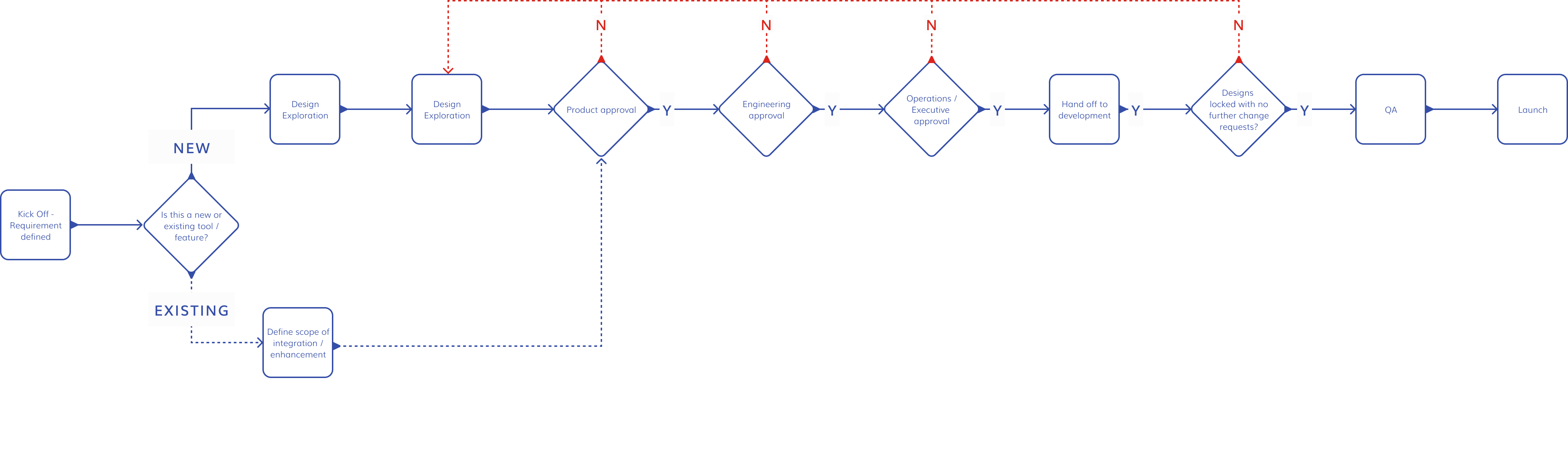
1. Define: Establish a Shared Process
The Define phase confirms requirements and feasibility before design begins. Design focuses on exploration and refinement before development, while Deliver tracks implementation, QA, launch, and post-launch changes.
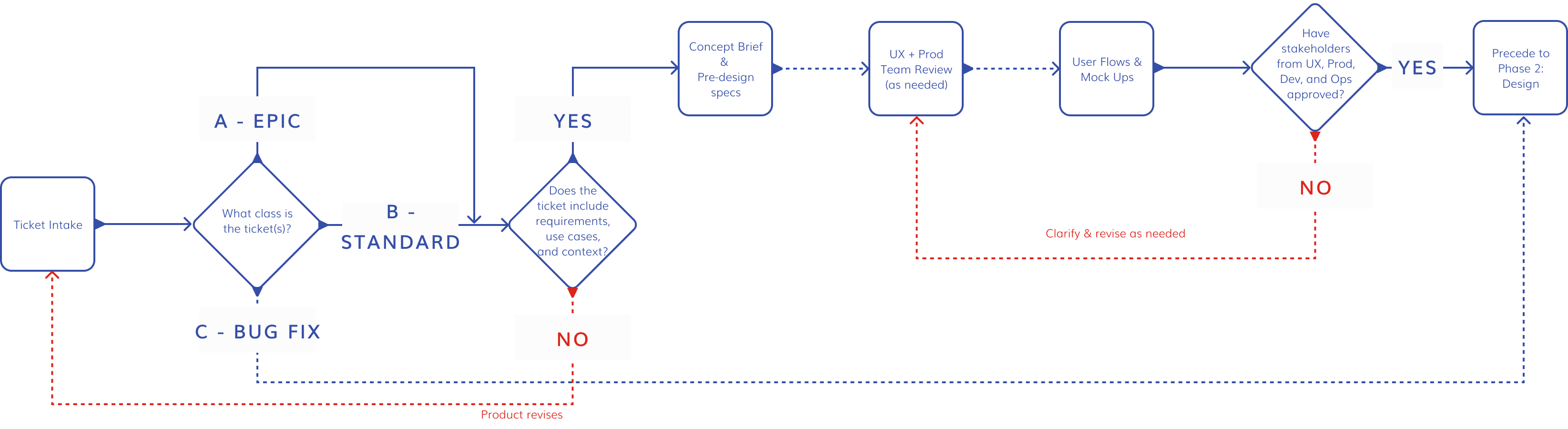
Not every project requires the same level of rigor, so I introduced three ticket types. Small requests can move quickly into design, while larger initiatives follow the full workflow with formal approval gates before significant time is invested.
One of the workflow's most valuable features is its ability to generate proof-of-concept mockups. As the AI absorbs project requirements and stakeholder feedback, it can use our design system to propose potential solutions before the design team creates anything in Figma.
This gives Product, Development, and Operations a visual artifact for evaluating feasibility and providing early feedback – often within a day instead of waiting one or two weeks for initial design iterations.
Design: Create a Single Source of Truth
Once stakeholders approve the requirements and direction, the lead designer moves into Figma, using AI to support exploration and track feedback as the work evolves. Product remains involved throughout, with another stakeholder approval checkpoint once the team has solidified a direction.
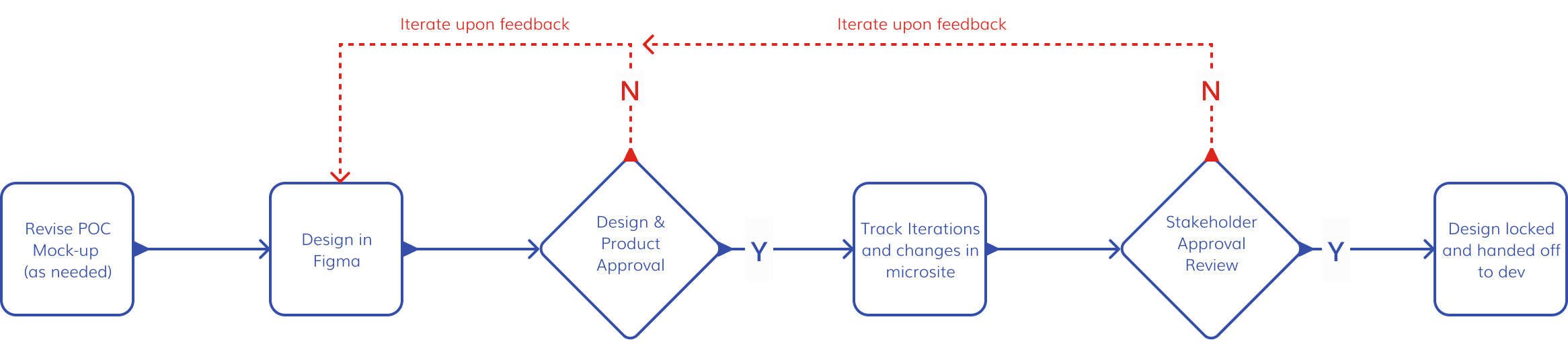
Every project generates a persistent microsite that tracks approvals, design versions, decisions, open questions, and requirement changes. Meeting outcomes are summarized into decisions and action items and added to the project history, while changes in requirements and scope are reflected back in Jira.
Instead of documentation becoming outdated, the project record evolves alongside the work.
Deliver: Post-handoff Monitoring
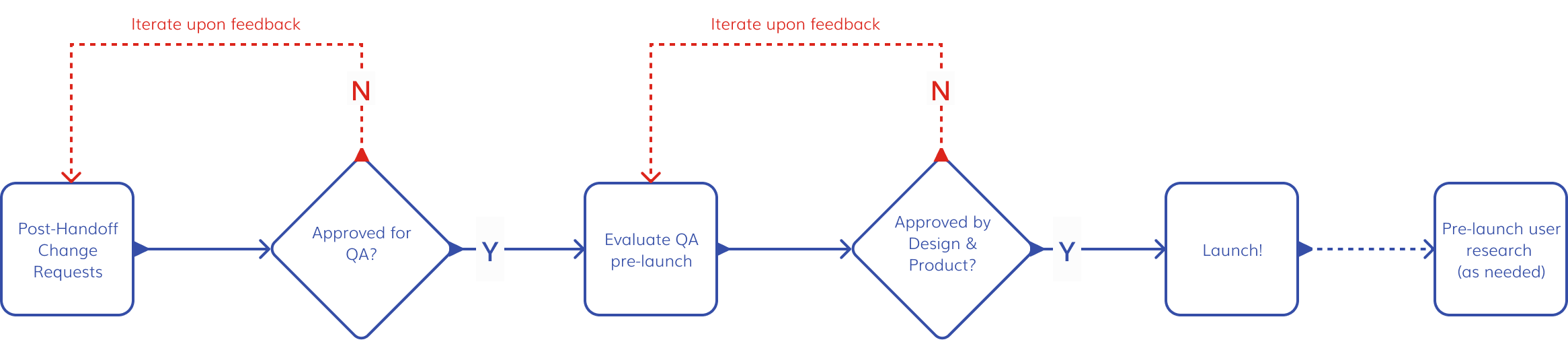
Design doesn't end at handoff. The Deliver phase keeps the UX team involved through development by making change requests and design QA part of the formal workflow. When implementation requires a change, it moves back through review rather than becoming an undocumented deviation from the approved design.
Before launch, the UX team conducts a final design QA and approval check, ensuring the experience being released still reflects the intent of the work that was approved.
Iterate Through Real Use
The workflow didn't emerge fully formed. I launched an initial two-phase model, tested it on active projects, and used feedback from the team to refine both the process and the tooling.
Over time, the workflow expanded into Define, Design, and Deliver; introduced three project types for different levels of complexity; and consolidated separate tools into a single system. Later iterations added the project microsite, automated meeting outcomes, and more detailed use cases to keep requirements and decisions connected throughout the project lifecycle.
Outcome
Over roughly twelve weeks, the workflow supported fifteen projects, including two epics and a larger cross-functional initiative. Formal stakeholder alignment became part of the process, while documentation, meeting outcomes, and requirement changes remained synchronized in a single source of truth.
The system also reduced the need for separate meeting notes, follow-up emails, and status documents by capturing and distributing project updates automatically.
The clearest sign of adoption came when leadership requested moving the workflow into Frequency's official GitHub organization, transforming what began as a personal productivity tool into shared team infrastructure.
Conclusion: Reflections & Takeaways
Over three and a half years at Frequency, I designed across nearly every stage of the streaming television lifecycle – from content ingest and automated scheduling to live broadcast operations and the workflows that support product development.
These projects span different domains, but share a common challenge: designing software for professional operators working in complex, high-pressure environments. Whether simplifying asset management, exploring AI-assisted scheduling, supporting live broadcasts, or improving our own design process, the goal was the same – reduce ambiguity, increase confidence, and help people make better decisions.
Along the way, I also contributed to Studio's design system and tokenization, conducted UX audits, and supported improvements across the broader platform.
Working in such a specialized industry taught me that good enterprise software isn't measured by how much it can do but by how confidently people can use it when their work matters most.